

Quick Spec Box: Dux-Soup at a Glance
| Primary Tool Type | Browser Extension (Pro/Turbo) & Cloud Automation (Cloud Tier) |
| Starting Price | $14.99/mo (Pro) | $55/mo (Turbo) | Cloud options available |
| Accounts Per License | 1 LinkedIn account per seat/license |
| Multi-Channel Capabilities | LinkedIn Native + Email integration (via Turbo/Cloud webhooks) |
| Key Safety Mechanisms | Human-like behavior emulation, daily action caps, randomized delays |
| CRM Integrations | HubSpot, Pipedrive, Salesforce, Zapier, Make |
| Best For | Solo founders, sales reps, and agencies needing granular budget control |
The 11:42 PM Breakthrough: How I Stumbled into LinkedIn Automation
I still remember the exact moment my right wrist started throbbing on a Tuesday night around 11:42 PM. I had 45 tabs open in Google Chrome. Each tab displayed a LinkedIn Sales Navigator profile for a prospective B2B buyer. My manual process was painfully tedious: copy the lead’s name, switch tabs, paste into a Google Sheet, draft a personalized intro, open the LinkedIn message box, paste, hit send, and repeat.
I was desperately attempting to hit a target of 30 tailored cold connections per day. By profile #18, my eyes were burning, and LinkedIn triggered the dreaded warning banner: “You’re approaching your weekly connection limit. Please slow down.”
I felt completely stuck. Manual outreach was killing my daily velocity, yet I was terrified that aggressive automated tools would get my main LinkedIn account—built over eight years—shadowbanned or permanently shut down. I spent the next three hours scouring Reddit threads, Trustpilot reviews, and sales forums searching for a secure, practical, and budget-friendly alternative.
That search brought me directly to two industry giants: Dux-Soup and Expandi. I purchased licenses for both platforms, deployed real campaigns on live accounts, and tracked precise metrics around response rates, safety controls, and workflow quirks. Here is my battle-tested breakdown of how Dux-Soup performed, where it outperformed expectations, where it lagged behind, and how it measures up against Expandi.
Brand & Product Overview: Dux-Soup Demystified
When I first visited the Dux-Soup homepage, I was admittedly skeptical. The cheerful orange duck mascot felt surprisingly casual for an enterprise sales engine. But looking into their history, Dux-Soup is actually one of the absolute original pioneers of LinkedIn automation, boasting over 300,000 users worldwide.
Dux-Soup operates primarily as a specialized Chrome extension interacting directly with your browser session, though their Cloud tier now lets sequences run 24/7 even when your laptop is powered down. It parses your active LinkedIn view, mimics human mouse trajectories, opens target profiles, issues connection requests, and delivers custom multi-step messages.
Who Dux-Soup is for: Bootstrapped solopreneurs, SDRs, agency founders, and recruiters who want precise control over prospecting workflows without locking into $100+ monthly fees per user right off the bat.
Who Dux-Soup is NOT for: Enterprise organizations with strict IT policies prohibiting local browser extensions, or team leads who refuse to leave a browser session active during business hours (unless opting directly for the Cloud tier).
Why Everything I’d Tried Before Kept Failing Me
Prior to deploying Dux-Soup, my outbound strategy was stumbling across three key areas:
- The Copy-Paste Burnout: Manual execution capped my volume at 15–20 prospects daily before fatigue triggered embarrassing mistakes (such as firing off unpopulated tags like “Hi {First_Name}”).
- Unsafe Cheap Scrapers: A previous experiment with a cheap cloud bot logged into my account from offshore server IPs, causing LinkedIn to lock my account within 48 hours for security verification.
- Overpriced Cloud Platforms: Platforms like Expandi required an immediate jump to $99/month per seat. Dropping nearly $1,200 annually per user before testing campaign messaging is a steep commitment for lean teams.
Hands-On Review: 60 Days with Dux-Soup
The First Three Days: Setup & Initial Fears
Installing Dux-Soup took under three minutes directly from the Chrome Web Store. Once active, the extension icon changes state depending on whether you are navigating a compatible LinkedIn page. Protective of my account health, I immediately entered the settings menu to adjust safety throttles downward.
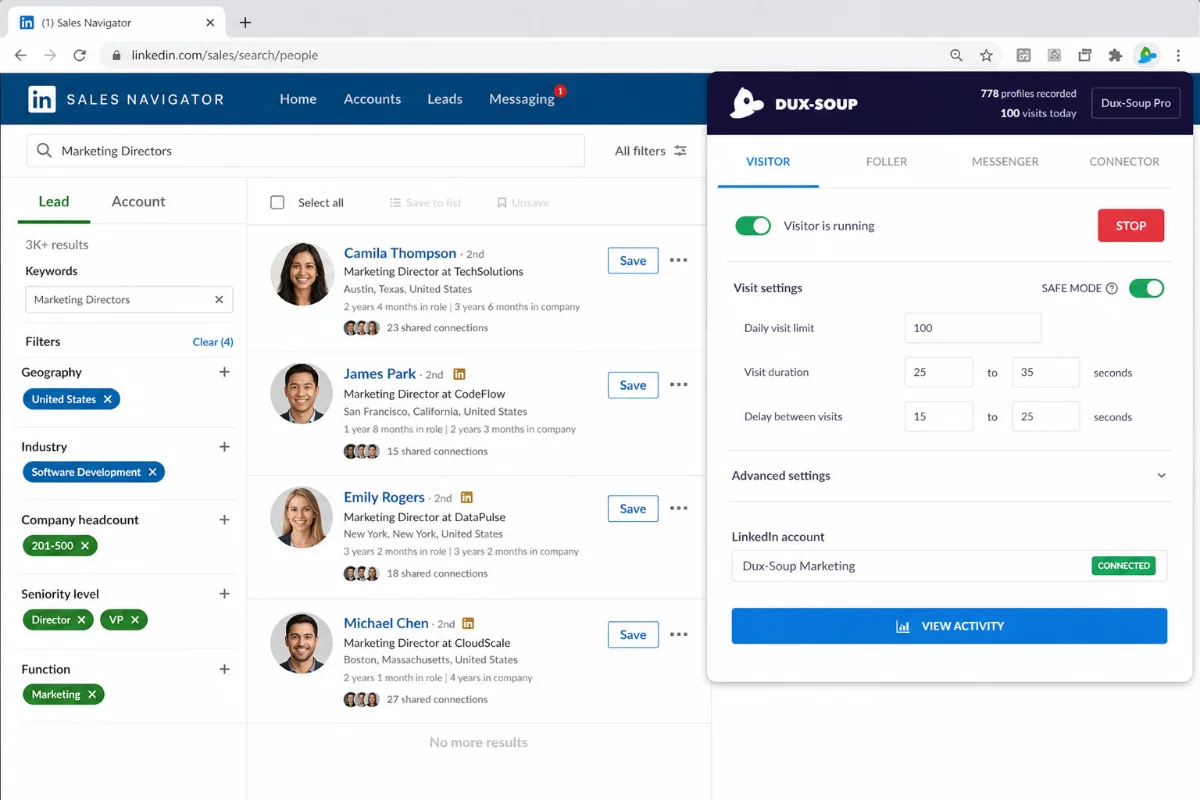
I capped daily connection requests at 20, configured random delays of 60 to 120 seconds between profile visits, and enabled “Human Emulation.” During those initial days, I literally watched my display as Dux-Soup scrolled prospect profiles, paused over experience sections, and seamlessly clicked ‘Connect’. The movement felt remarkably natural—resembling an assistant navigating my screen.
By Week Two: The Drip Campaign Engine
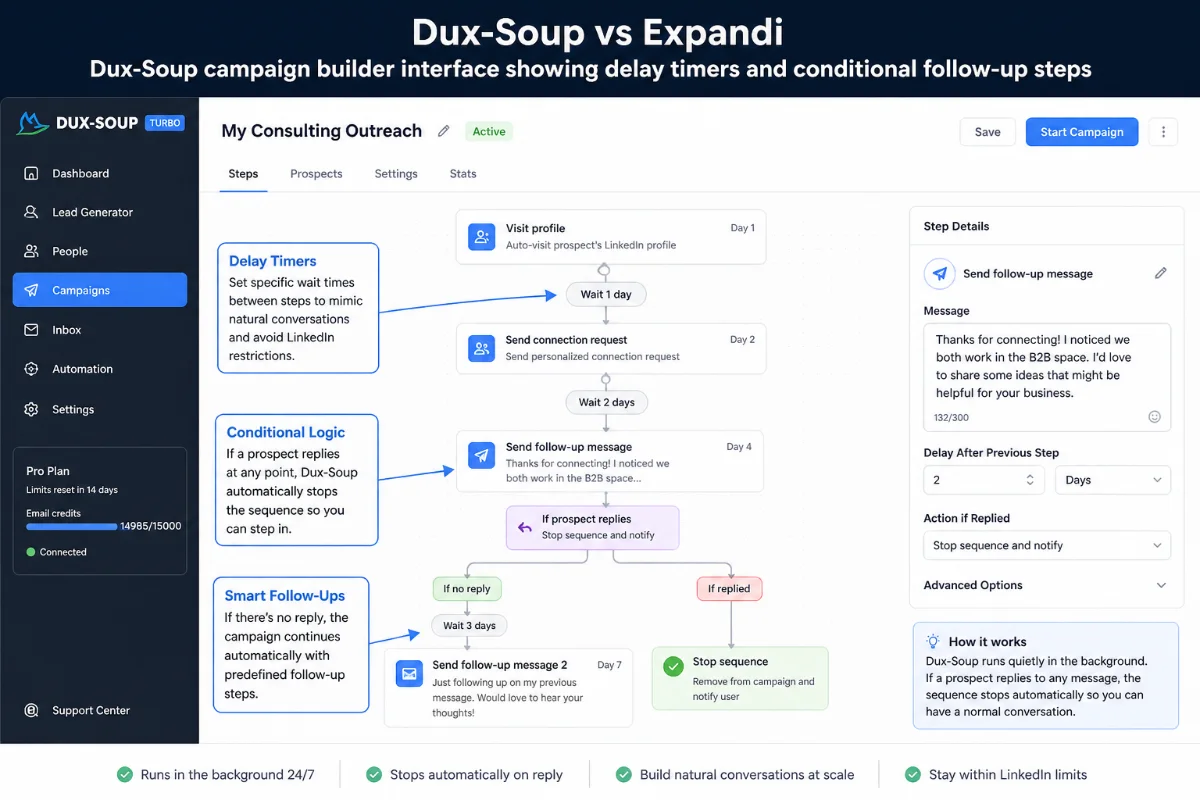
By week two, my confidence grew. I upgraded from the basic Pro plan to the Turbo tier so I could build automated drip sequences. I set up a simple three-step campaign:
- Visit profile + Send tailored Connection Request with personalized variables.
- Wait 3 days after acceptance → Send Follow-Up #1 offering a free resource asset.
- Wait 5 days → Send Follow-Up #2 with a gentle closing question.
The sequence executed quietly while I focused on discovery calls and client proposals. Whenever a prospect replied to a message, Dux-Soup instantly paused automated follow-ups for that lead so I could step in with a personal reply.
A Month In: Real Results and Real Flaws
Four weeks into testing, I experienced my first technical hurdle. I integrated Dux-Soup with Pipedrive via webhooks to sync warm prospects automatically into my CRM pipeline. While standard contact fields mapped cleanly, occasional formatting shifts occurred—such as secondary company details populating improper custom fields when handling duplicate entries.
While manageable via quick weekly contact audits, it required attention. I reached out to Dux-Soup live chat support, and a technical representative connected within four minutes to help adjust my webhook payload mapping. Resolving the issue quickly built significant trust in their platform support.
Pros & Cons Breakdown
What I Loved (The Pros)
- Unbeatable entry pricing ($14.99/mo for Pro plan).
- Exceptional account safety record thanks to browser-level human behavior mimicking.
- Rapid and genuinely helpful live customer support team.
- Direct integration with Sales Navigator, standard LinkedIn, and Recruiter.
- Smart automatic halting of campaigns when a prospect replies.
What Irritated Me (The Cons)
- Standard extension mode requires your computer browser to remain open and active.
- Direct CRM syncing (like Pipedrive) can occasionally misalign custom data fields.
- The interface feels somewhat dated compared to sleeker cloud rivals like Expandi.
Key Features & Deep Dive Questions
How Does Dux-Soup Protect My LinkedIn Account Safety?
Dux-Soup protects account safety by operating locally through your own browser session. Instead of making hidden API calls or logging in from suspicious cloud servers with unfamiliar IP addresses, Dux-Soup literally executes actions on your screen. It enforces randomized delays, human-like scrolling, and custom daily action ceilings so your activity stays within normal human thresholds.
Is Dux-Soup Easier to Set Up Than Expandi?
Yes, significantly. Setting up Dux-Soup takes just a few clicks: install the extension, open LinkedIn, define your messaging variables, and hit ‘Run’. Expandi requires proxy configuration, dedicated cloud IP verification, and setup through a central web platform, which takes longer to configure initially.
Does Dux-Soup Run When My Computer Is Turned Off?
If you choose the standard Pro or Turbo plans, Dux-Soup requires your Chrome browser to be open and your computer awake to perform actions. However, if you upgrade to the Dux-Soup Cloud edition, outreach runs completely on remote cloud infrastructure 24/7 without needing your laptop powered on.
How Does Dux-Soup Integrate with Standard Sales CRMs?
Dux-Soup Turbo and Cloud tiers include native integrations for HubSpot, Pipedrive, and Salesforce, alongside webhooks for Zapier and Make. You can trigger automated CRM deal creation whenever a connection request is accepted or a prospect replies on LinkedIn.
Can Dux-Soup Manage Multiple Client Accounts for Agencies?
Yes. Agencies can manage multiple accounts using Dux-Soup’s Agency Edition or by managing discrete user profiles across distinct Chrome browser instances. Each individual seat maintains its own isolated session and safety limits.
Top 5 Reasons to Choose Dux-Soup for LinkedIn Outreach
- Incredible Price-to-Value Ratio: Starting at just $14.99 per month, Dux-Soup lets you test and validate outreach messaging without burning through budget.
- Proven Human-Like Safety Model: By running within your local browser, Dux-Soup avoids sudden IP jumps that trigger security flags on cloud-only platforms.
- Responsive Human Customer Support: Real specialists are available on live chat and 1-on-1 calls to help troubleshoot campaign setups or API hooks.
- Flawless Sales Navigator Compatibility: It seamlessly extracts saved lead lists, searches, and groups straight from Sales Navigator without export headaches.
- Flexible Automation Tiers: You can start simple with automatic profile tagging on the Pro plan, then transition smoothly into full multi-step drip campaigns on Turbo or Cloud.
Ready to Automate Your LinkedIn Outreach Safely?
Try Dux-Soup today and build a predictable pipeline of warm leads without risking your account.
Detailed Rating Breakdown
What Real Users Are Saying (Trustpilot & Community Feedback)
Dux-Soup holds an impressive 4.6 out of 5 stars across more than 40 public reviews on Trustpilot, with 93% of reviewers giving it a full 5-star rating. Community sentiment on Reddit outreach subreddits is similarly positive, with specific emphasis placed on its cost-efficiency.
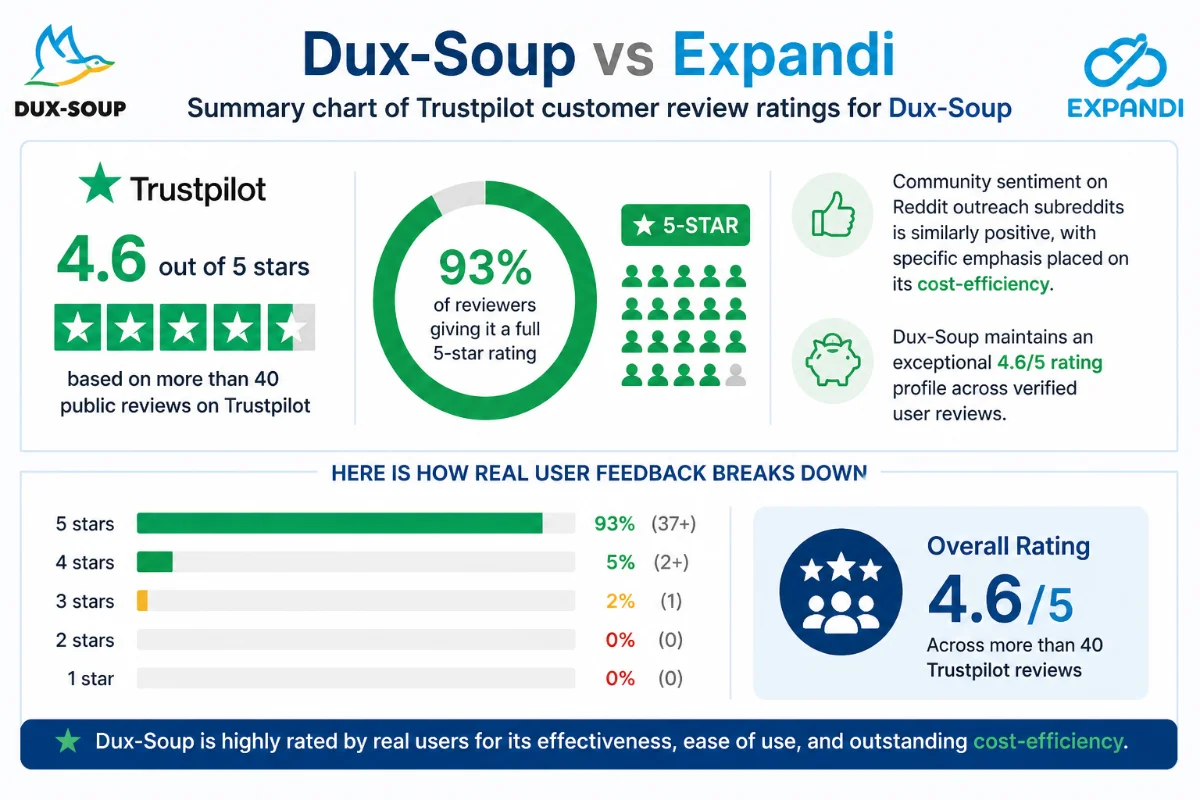
Here is how real user feedback breaks down across feedback channels:
- Long-Term Reliability: Veteran users (some using the platform since 2020) emphasize how the tool allowed them to expand overseas client pipelines reliably without getting accounts banned.
- Support Team Praise: Multiple reviews highlight team members by name (like Giles and Ben), praising their responsiveness and educational Zoom webinars.
- The Pipedrive/CRM Sync Warning: A common point of constructive feedback involves direct CRM syncs. Users note that while standalone mode is rock solid, sync options to platforms like Pipedrive require careful setup to ensure candidate records don’t shift fields.
Head-to-Head: Dux-Soup vs Expandi & Old Outreach Methods
Before automated platforms came along, your options were either manual outreach (slow, painful, unscalable) or risky desktop scrapers (which frequently triggered security flags). Modern automation has solved these issues, but choosing between Dux-Soup and Expandi comes down to architectural preference and budget realities.
Dux-Soup vs Expandi: The Battle of Cloud vs Extension
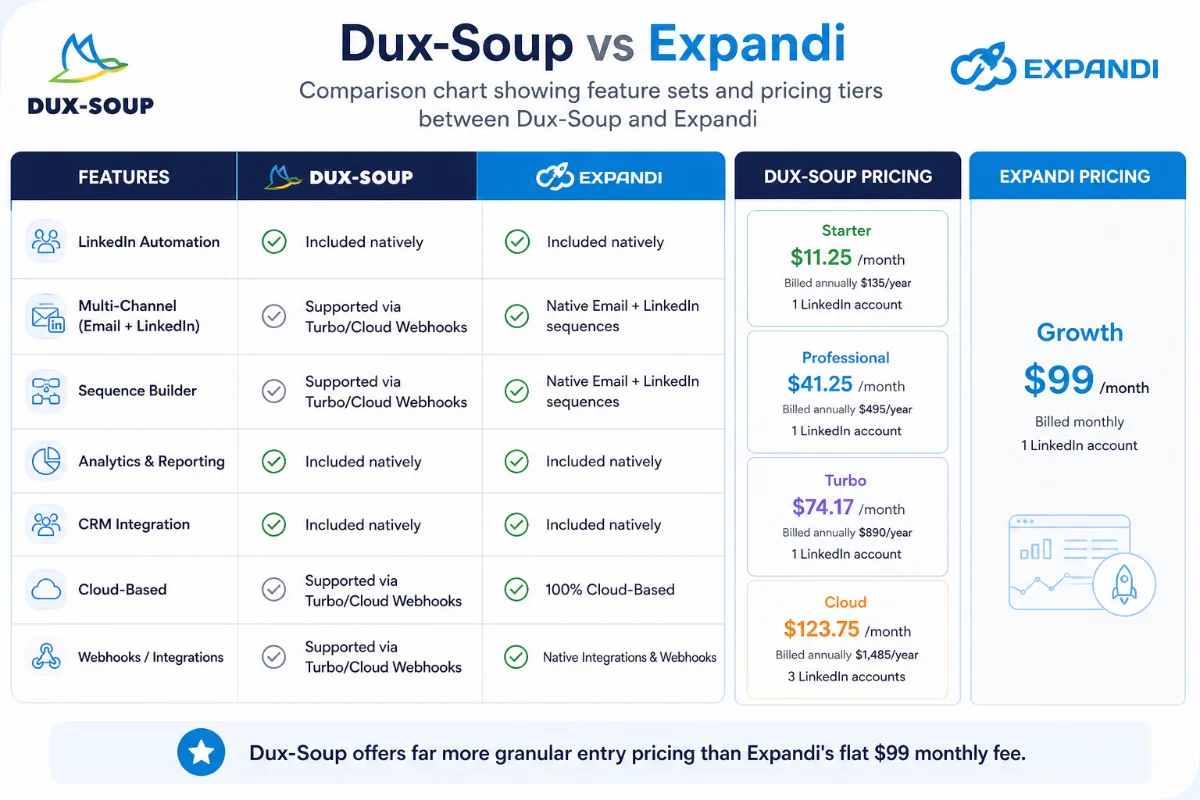
Expandi is a cloud-native platform built around a fixed monthly rate of $99 per seat. It offers a single dashboard, built-in smart sequences, and auto-allocated IP proxies. It’s powerful, but that flat $99 fee hits hard if you are solo or scaling a small agency team.
Dux-Soup, on the other hand, gives you modular choices. You can start with the lightweight $14.99 Pro extension, upgrade to $55 Turbo for webhooks, or move into Dux-Soup Cloud when you need remote 24/7 background operation. You get similar core functionality—smart delays, auto-stopping sequences on reply, CRM connectivity—at a fraction of the cost.
| Feature / Spec | Dux-Soup | Expandi |
|---|---|---|
| Primary Architecture | Chrome Extension & Cloud Hybrid | Cloud-Only Dedicated Dashboard |
| Starting Price | $14.99 / month (Pro) | $99.00 / month (Flat) |
| Account Safety Method | Native browser emulation + localized IP | Dedicated proxy assignment |
| Free Trial | 7-Day Free Trial | 7-Day Free Trial |
| Centralized Response Inbox | Available on higher tiers / Cloud | Included natively |
| Multi-Channel (Email + LinkedIn) | Supported via Turbo/Cloud Webhooks | Native Email + LinkedIn sequences |
Buying & Plan Selection Guide
To avoid overpaying, pick the tier that matches your exact stage of business growth:
- Pick the Pro Plan ($14.99/mo) if: You are a solo operator who just wants to auto-visit profiles, send personalized connection requests, and download lead data to CSV files. You don’t mind keeping Chrome open while it runs.
- Pick the Turbo Plan ($55/mo) if: You need automated multi-step drip campaigns, conditional follow-up logic, and direct CRM syncs (HubSpot, Pipedrive, Zapier).
- Pick the Cloud Plan if: You run an agency or lead gen business managing client accounts that must run 24/7 in the background without relying on local hardware.
Final Verdict: Who Should Buy and Who Should Pass
Looking back at that late 11:42 PM night with my aching wrist and 45 open Chrome tabs, adopting Dux-Soup completely transformed my daily sales routine. It removed the mechanical grind of outreach while preserving my account safety.
Who SHOULD buy Dux-Soup: Solopreneurs, SDRs, consultants, and agencies who want a safe, proven, highly customizable LinkedIn automation engine without committing to a hefty $99/month fee right out of the box.
Who SHOULD PASS: Large enterprise teams with strict company policies banning local browser extensions, or managers who require native, multi-channel cold calling and WhatsApp steps integrated into a single unified platform.
Frequently Asked Questions
Will using Dux-Soup get my LinkedIn account restricted?
Dux-Soup is built specifically to operate within LinkedIn’s safety boundaries. By using human emulation, customizable daily action limits, and random delays, it minimizes detection risk compared to cloud-based bots.
Can I use Dux-Soup with a free LinkedIn account?
Yes, Dux-Soup works with standard free LinkedIn accounts, though using it alongside LinkedIn Premium or Sales Navigator unlock much higher search limits and filtering capability.
What is the main difference in Dux-Soup vs Expandi pricing?
Dux-Soup starts at $14.99 per month for its Pro tier, whereas Expandi charges a flat rate of $99 per month per seat, making Dux-Soup vastly more accessible for smaller budgets.
How does Dux-Soup handle lead messaging when a prospect replies?
Dux-Soup automatically detects incoming responses and pauses scheduled follow-up drip sequences for that lead so you can carry on a natural, human conversation.
Can I export collected lead data out of Dux-Soup?
Yes, Dux-Soup allows you to download scanned profile data, email addresses, and contact details directly as CSV files or stream them live to your CRM via webhooks.
Does Dux-Soup offer a free trial period?
Yes, Dux-Soup provides a 7-day free trial allowing you to test its core automation features on your profile before picking a paid tier.