

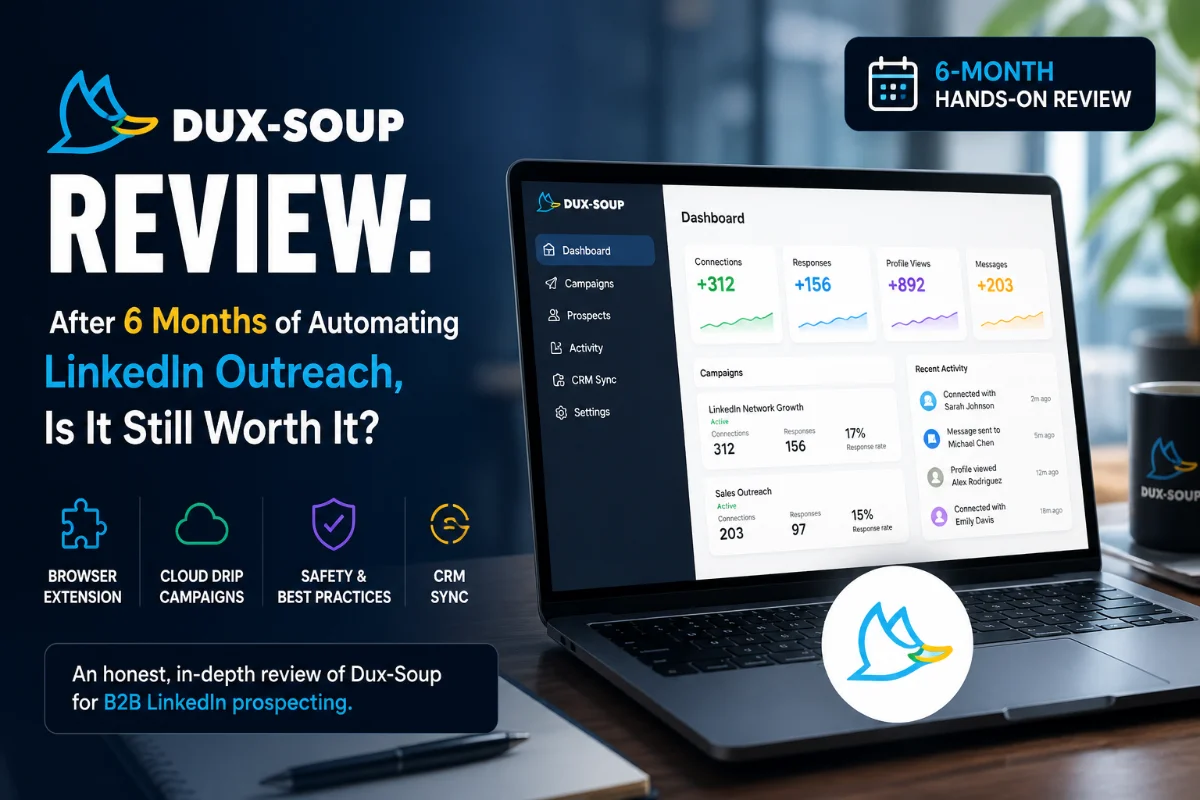
I put my main LinkedIn account on the line to test Dux-Soup’s automated profile views, connection drips, and CRM syncs. Here is what actually happened to my pipeline—and my browser.
Browser & Cloud Options
14-Day Free Trial
- Quick Spec Box
- The Night My Manual Outreach Broke Me
- Brand & Product Overview: Discovering Dux-Soup
- Hands-On Review: Six Months in the Trenches
- Pros & Cons Breakdown
- Specs & Key Questions
- Top 5 Reasons to Choose Dux-Soup
- Detailed Rating Breakdown
- What Real Users Are Saying (Trustpilot & Reddit)
- Dux-Soup vs. Competitors (SalesRobot & PhantomBuster)
- Plan Selection Guide: Pro, Turbo, or Cloud?
- Final Verdict: Who Should Buy and Who Should Skip
- Frequently Asked Questions
| Starting Price | $14.99/mo (Pro) | $55/mo (Turbo) | $99/mo (Cloud) |
|---|---|
| Platform Architecture | Google Chrome Extension (Pro/Turbo) & Cloud Native (Cloud) |
| Free Trial | 14 Days (Full Turbo access, no credit card required) |
| Key Automation Features | Auto profile views, connection requests, multi-step drip sequences, endorses |
| Supported LinkedIn Tiers | Standard Free LinkedIn, Sales Navigator, Recruiter Lite |
| Native Integrations | HubSpot, Pipedrive, Zapier, Make, Webhooks |
| Editor Rating | 4.4 / 5.0 Stars |
The Night My Manual Outreach Broke Me
It was 11:45 PM on a Tuesday. My eyes were burning from staring at a dual-monitor setup packed with thirty open LinkedIn tabs and a messy Google Sheet. I was trying to send my 47th personalized connection request of the evening. Wrist aching, fatigue settling in, I accidentally pasted “Hi John, saw your recent post about B2B scaling…” into a connection request sent to a VP of Sales named Sarah. The moment I clicked send, my stomach dropped. There was no unsend button—just pure, unprofessional embarrassment.
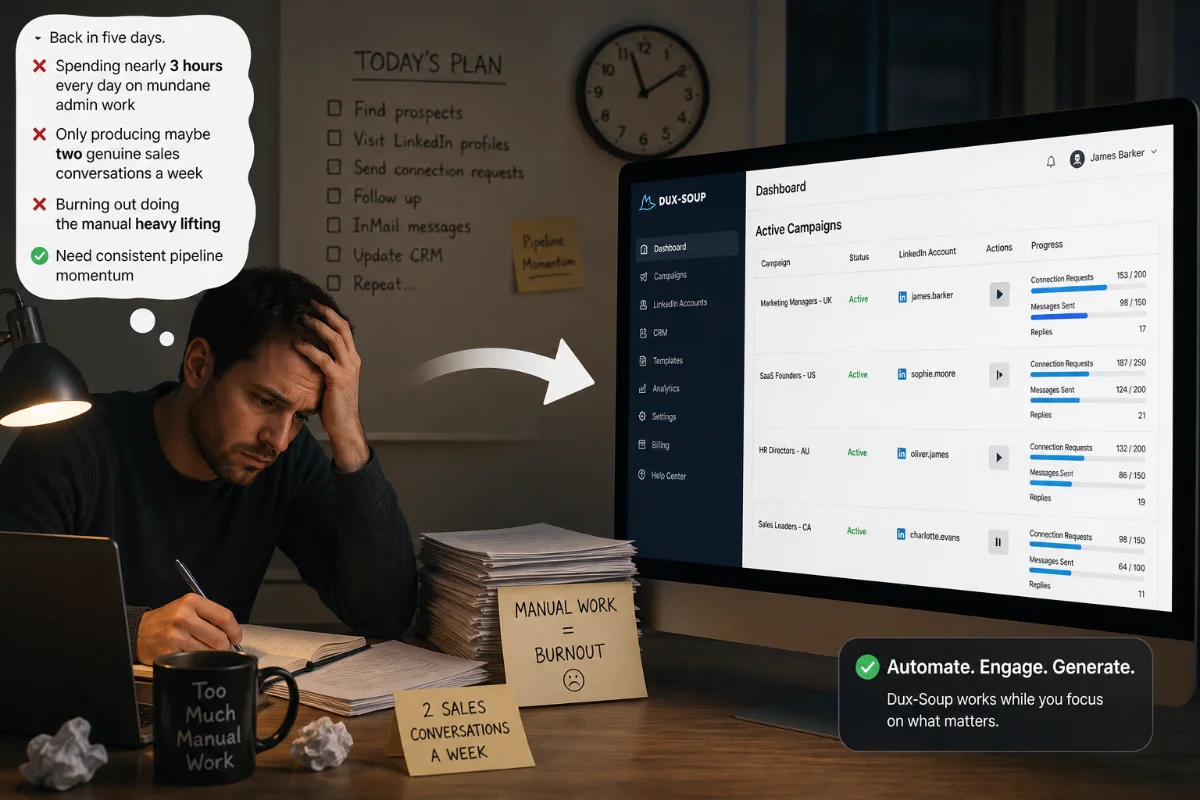
For months, my daily routine was an endless, draining treadmill: wake up, open LinkedIn Sales Navigator, run a search filter, copy names, copy company details, write a slightly customized note, click connect, paste details into a CRM spreadsheet, and set a calendar reminder to check back in five days. I was spending nearly three hours every single day doing mundane admin work that produced maybe two genuine sales conversations a week. I wanted consistent pipeline momentum, but I was burning out fast doing the manual heavy lifting.
Brand & Product Overview: Discovering Dux-Soup
I bumped into Dux-Soup while scrolling through an online sales forum late one night. A veteran recruiter mentioned he had been quietly running it in the background for years to build his executive candidate network on autopilot. I was deeply skeptical. Over the previous two years, I had already burned my fingers on multiple “growth hacking” tricks that fell flat:
- Manual Copy-Paste Spree: Utterly unsustainable. It consumed fifteen hours of my week, caused human errors like my infamous “Hi Sarah/John” mix-up, and left zero time for actual discovery calls.
- Generic Email Scraping + Cold Email Blasts: I bought scraper credits, scraped email addresses off LinkedIn profiles, and dumped them into cold email software. The result? High bounce rates, aggressive spam filters, and prospect response rates hovering below 1%. Most decision-makers ignored cold emails altogether, preferring LinkedIn DMs.
- Bloated $100+/Month Enterprise Platforms: I tested heavy multi-channel tools that required complicated setup calls, multi-year contracts, and weeks of onboarding before I could even send a single message. My modest monthly budget couldn’t justify that expense.
Dux-Soup promised something far simpler: a lightweight tool designed to automate the exact manual steps I was already performing inside my browser—visiting profiles, sending connection notes, endorsing skills, and executing drip follow-up sequences. I signed up for their 14-day free trial, half-expecting another clunky tool that would break after twenty minutes.
Hands-On Review: Six Months in the Trenches
Installing Dux-Soup took less than two minutes. It lives as a little duck icon in your browser toolbar. But let me be completely transparent: my initial experience wasn’t love at first sight. The user interface felt decidedly retro, resembling software built in 2017 rather than a modern web app. It took me a few hours of tinkering to understand how campaigns, tags, and daily limits interacted.
The First Three Days: I started slow, setting conservative daily safety limits (20 profile views, 10 connection requests per day). Watching the browser extension execute actions on its own was almost mesmerizing. It opened profile tabs, paused for a few seconds to simulate human scrolling, clicked connect, filled in my custom dynamic variables (like first name and company title), and closed the tab. By day three, my acceptance rate sat at a respectable 28% without me touching a single button during business hours.
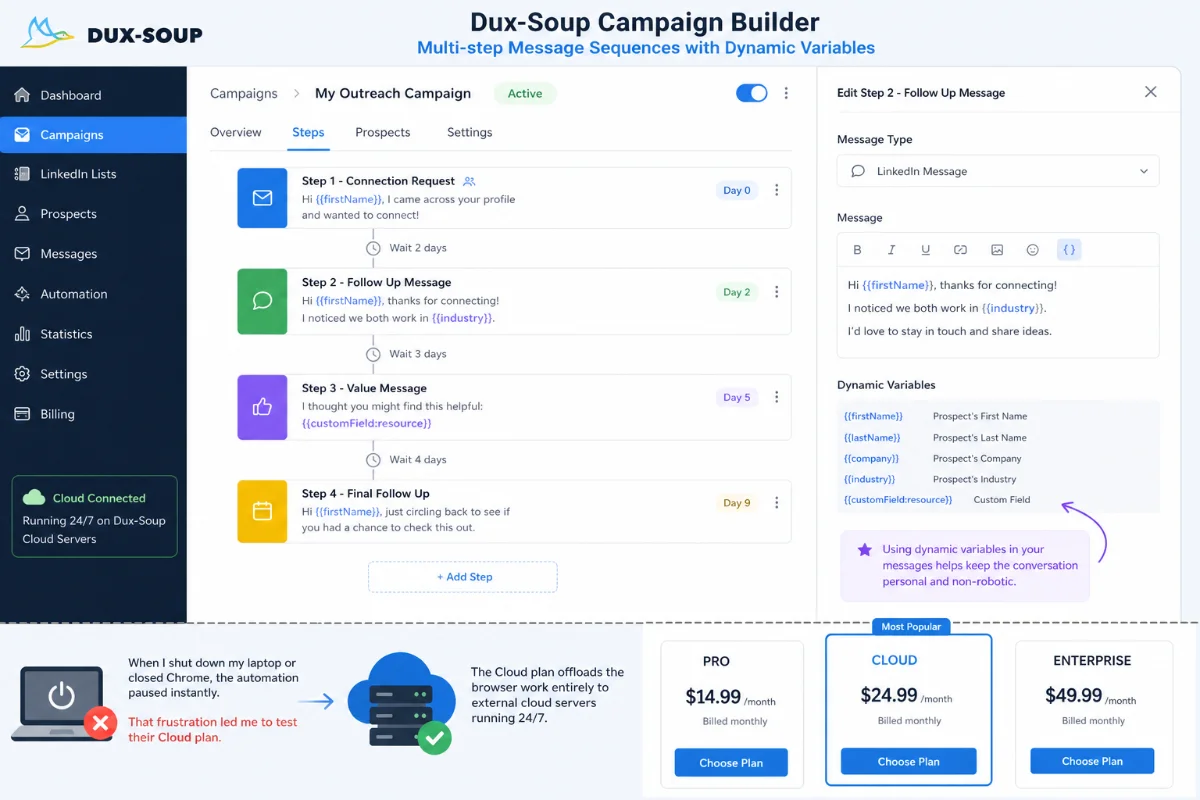
By Week Two: I upgraded to the Turbo plan to test multi-step drip campaigns. This was where the real leverage kicked in. I set up a three-step sequence: Step 1 (Auto-visit profile and endorse top skill), Step 2 (Send personalized connection request 24 hours later), Step 3 (Send a polite, value-focused follow-up message 3 days after connection acceptance). The beauty of the system was its auto-pause trigger: the moment a prospect replied to any message, Dux-Soup automatically removed them from the campaign sequence, allowing me to step in and take over the conversation personally.
A Month In (and the Realities of Chrome Extensions): After four weeks, I hit my first real speed bump. Because the basic Dux-Soup plans run as a Chrome extension, all automation happens inside your local browser. Whenever Dux-Soup was actively visiting profiles in the background, my browser felt slightly sluggish. Opening a new tab on LinkedIn caused a noticeable five-to-ten-second delay. Furthermore, if I shut down my laptop or closed Chrome to head out for lunch, the automation paused instantly. That frustration eventually led me to test their Cloud plan, which offloads the browser work entirely to external cloud servers running 24/7.
Pros & Cons Breakdown
What I Loved (Pros)
- Low entry price: Individual plans start at just $14.99 per month, making it exceptionally accessible for solo operators.
- Native LinkedIn execution: Operates directly within your active LinkedIn or Sales Navigator session, maintaining complete account activity history.
- Smart auto-pause safety: Instantly halts automated sequences as soon as a prospect replies so you can converse naturally.
- Flexible cloud upgrade: Offers a Cloud plan ($99/mo) that runs 24/7 without requiring your computer browser to stay open.
- Solid CRM webhooks: Easily connects connection data and conversation responses into HubSpot, Pipedrive, or Zapier workflows.
What I Didn’t Love (Cons)
- Dated user interface: The visual layout feels old and requires a short learning curve to navigate menus confidently.
- Browser tab slowdowns: Running the standard Chrome extension can cause noticeable 5-to-10-second delays during regular LinkedIn browsing.
- Occasional CRM sync bugs: Integrating directly with Pipedrive sometimes created duplicate records or mismatched organization names requiring manual review.
- Requires strict limit settings: Aggressive users who push daily connection numbers too high risk triggering LinkedIn safety warnings.
Specs & Key Questions
Is Dux-Soup safe for my LinkedIn account?
Dux-Soup is generally safe if you adhere strictly to conservative daily limits (under 30–40 connection requests per day) and utilize human-like delay settings. Because the standard extension operates through your actual browser session and local IP address, it mimics natural browsing behavior far better than cheap scraper scripts. However, sending excessive blasts will risk account restrictions regardless of the tool used.
How much does Dux-Soup cost?
Dux-Soup offers three main individual price tiers: Pro Dux at $14.99/month ($11.25/mo billed annually), Turbo Dux at $55/month ($41.25/mo billed annually), and Cloud Dux at $99/month ($74.17/mo billed annually). Team and agency multi-seat volume packages are also available.
Does Dux-Soup run without keeping my browser open?
Only on the Cloud Dux plan ($99/month). On the entry-level Pro and Turbo plans, Dux-Soup runs entirely as a Chrome extension inside your browser session, meaning automation pauses whenever your computer is asleep or Google Chrome is closed.
How does Dux-Soup sync with CRMs like HubSpot and Pipedrive?
Dux-Soup includes built-in connectors and webhook triggers for HubSpot, Pipedrive, and Zapier. As prospects accept invites or reply to messages, their profile details, contact information, and messaging activity are automatically posted to your CRM contacts record.
Is Dux-Soup worth it for small business owners?
Yes. For individual founders, freelancers, and recruiters who want automated LinkedIn outreach without paying $100+ per month for heavy enterprise platforms, Dux-Soup delivers unmatched ROI for its price point.
Top 5 Reasons to Choose Dux-Soup
- Unbeatable Cost-to-Performance Ratio: At $14.99/month for entry-level automation, Dux-Soup is one of the most affordable tools on the market. You get profile visiting, data scraping, and basic messaging for a fraction of what competitors charge.
- Preserves Native LinkedIn Data: Because Dux-Soup executes actions inside your actual LinkedIn interface (Standard, Sales Navigator, or Recruiter), all conversation history, tags, and profile interactions remain safely logged inside your native inbox.
- Smart Drip Sequence Flexibility: The campaign builder in Turbo and Cloud plans allows you to craft multi-step follow-up schedules with custom time delays, ensuring prospects receive timely touchpoints without feeling spammed.
- Deep CRM Ecosystem Connectivity: You don’t need to manually export CSV files every night. Dux-Soup can push freshly harvested lead data, email addresses, and message logs directly into HubSpot or Zapier automatically.
- Responsive Human Customer Support: Unlike many software tools that relegate support to automated chatbots, Dux-Soup maintains a genuinely helpful support team accessible via live chat and scheduled Zoom sessions to troubleshoot technical roadblocks.
Start your 14-day full feature free trial today—no credit card required. Experience automated profile visiting and drip sequences firsthand.
Detailed Rating Breakdown
What Real Users Are Saying (Trustpilot & Reddit)
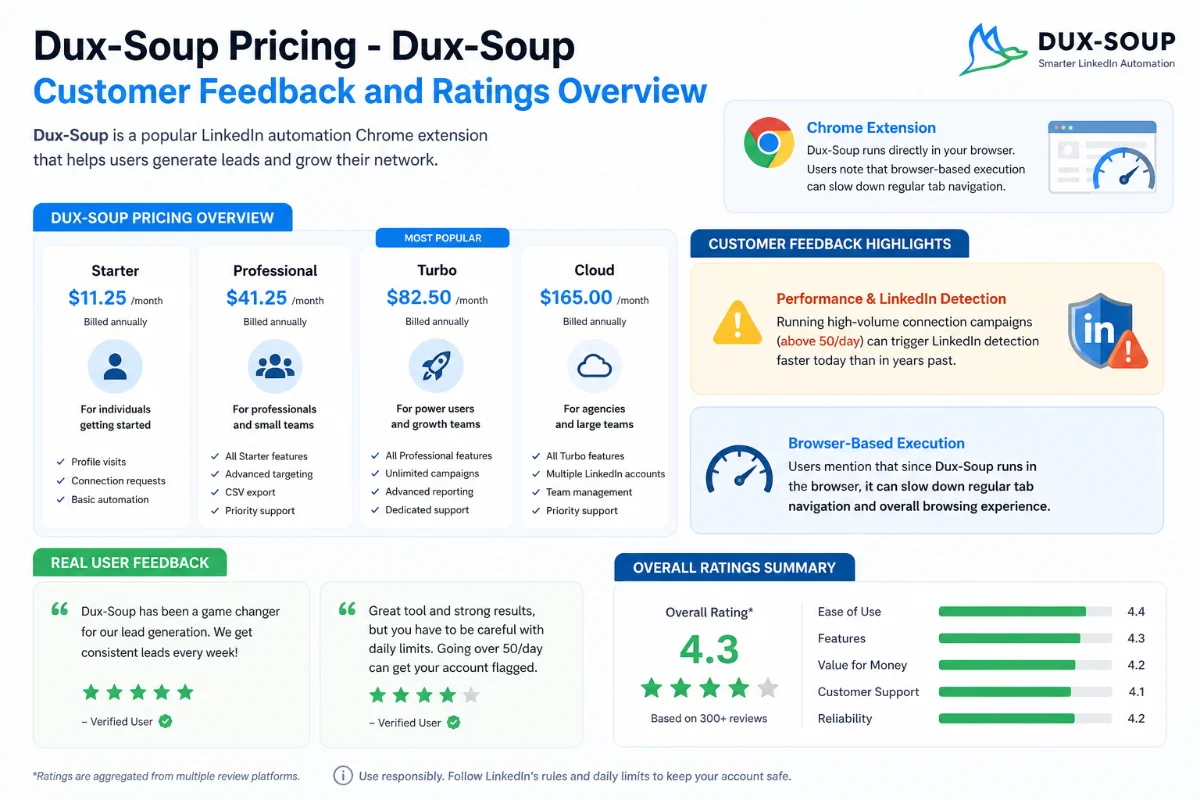
To ensure my review wasn’t an isolated experience, I spent hours analyzing verified customer feedback across Trustpilot (where Dux-Soup holds a 4.6/5 rating across dozens of reviews) and active Reddit discussions in sales and marketing communities.
- Praise for Pipeline Growth & Support: Long-time users frequently highlight how the software allows small teams to systematically build international client networks without massive headcount. Reviewers consistently compliment the support team (often citing staff members by name) for offering hands-on Zoom troubleshooting calls to solve complex setups.
- Frustrations with CRM Data Integrity: On Trustpilot, users like John Collins noted that while Dux-Soup works reliably in standalone mode, connecting it directly to CRMs like Pipedrive can occasionally result in data integrity issues—such as company records mismatched or candidate details needing manual verification.
- Concerns Over Browser Lag & Account Flags: Reddit discussions on subreddits like r/EntrepreneurRideAlong and r/b2bmarketing echo my feelings about the Chrome extension. Users mention that browser-based execution slows down regular tab navigation, and warn that running high-volume connection campaigns (above 50/day) can trigger LinkedIn detection faster today than in years past.
Dux-Soup vs. Competitors
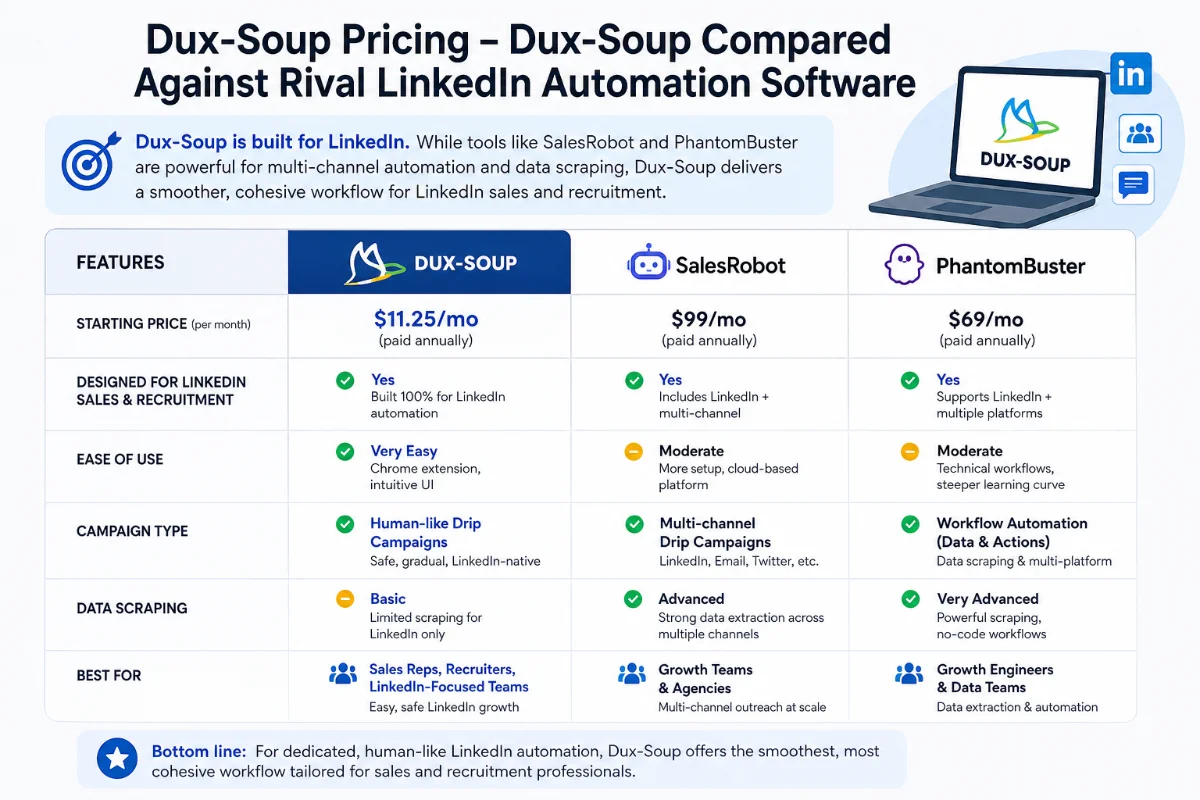
How does Dux-Soup measure up against other popular sales engagement tools on the market? Below is a direct comparison based on key specs, architecture, pricing, and specialized capabilities.
| Feature / Spec | Dux-Soup | SalesRobot | PhantomBuster |
|---|---|---|---|
| Base Pricing | $14.99 / month | $59.00 / month | $59.00 / month |
| Architecture | Chrome Extension / Cloud | 100% Cloud-Based | Cloud Automations (Phantoms) |
| Free Trial | 14 Days (No Credit Card) | 14 Days (No Credit Card) | 14 Days (Free Tier) |
| Channels | LinkedIn Only | LinkedIn + Email Drip | LinkedIn, Twitter, Google, etc. |
| AI Capabilities | AI Messages (Claude/ChatGPT) | AI Voice/Video & Commenting | Basic Data Enrichment AI |
| Browser Impact | Slight Lag (Extension mode) | None (Runs on server) | None (Runs on cloud) |
Dux-Soup vs. SalesRobot
SalesRobot is a 100% cloud-native alternative that starts higher ($59/mo) but incorporates heavy AI features like cloned voice notes, personalized video messages, and automated post commenting. If you require true multi-channel cold email + LinkedIn sequences in a single dashboard without ever running a browser extension, SalesRobot is a strong choice. However, if you want straightforward, budget-friendly LinkedIn outreach without paying steep monthly fees, Dux-Soup remains far more cost-effective.
Dux-Soup vs. PhantomBuster
PhantomBuster relies on modular cloud “Phantoms” that can scrape and execute actions across dozens of social platforms (Instagram, Twitter, Google Maps, LinkedIn). It is an extraordinary data scraping tool for growth engineers. But for executing dedicated, human-like sales drip campaigns specifically inside LinkedIn, Dux-Soup offers a much smoother, cohesive workflow tailored for sales reps and recruiters.
Plan Selection Guide: Pro, Turbo, or Cloud?
Choosing the right plan depends heavily on your daily workflow, technical setup, and budget:
- Pick Pro Dux ($14.99/mo) if: You are a solo founder, freelancer, or sales rep on a tight budget who only needs basic profile visiting, single connection requests, auto-tagging, and CSV profile scraping. You don’t mind keeping your browser tab open while running campaigns.
- Pick Turbo Dux ($55/mo) if: You need automated, multi-step drip campaign sequences (Visit → Connect → Follow-up 1 → Follow-up 2) and want native integrations with HubSpot, Pipedrive, or Zapier to push contacts directly into your CRM.
- Pick Cloud Dux ($99/mo) if: You hate browser lag, don’t want to keep your computer turned on, run outreach for multiple clients or team members, or want maximum account security with 24/7 cloud execution running on dedicated infrastructure.
Final Verdict: Who Should Buy and Who Should Skip
After six months of testing, Dux-Soup has earned a permanent place in my lead generation stack—with a few clear caveats.
Who SHOULD Buy Dux-Soup:
- B2B sales reps, recruiters, and agency owners who want to eliminate hours of manual profile viewing and connection outreach.
- Budget-conscious users who want powerful automation starting at under $15 per month.
- Teams operating inside LinkedIn Sales Navigator who want native campaign tracking without complex external platforms.
Who SHOULD SKIP Dux-Soup:
- Users expecting slick, modern UI software without any setup learning curve.
- Marketers looking for heavy multi-channel cold email automation built into a single platform (consider SalesRobot or Waalaxy instead).
- Aggressive “blast” outreach operators who plan to send hundreds of invitations daily without respecting LinkedIn safety limits.
Dux-Soup won’t magically write compelling sales copy for you, nor will it close deals on its own. But if you have a clear target audience and a sincere message, it completely removes the brutal admin friction of LinkedIn prospecting.
Frequently Asked Questions
Is Dux-Soup better than SalesRobot?
Dux-Soup is significantly cheaper (starting at $14.99/mo) and offers deep native CRM integrations. SalesRobot costs more ($59+/mo) but is entirely cloud-native, offers AI voice/video messaging, and handles multi-channel email outreach simultaneously. Dux-Soup is best for budget-focused LinkedIn outreach, while SalesRobot suits multi-channel AI users.
Does Dux-Soup offer a free plan or free trial?
Dux-Soup offers a free Starter edition with basic profile viewing and manual tagging limits. They also provide a 14-day free trial of the full Turbo feature set with no credit card required, allowing you to test automated drip sequences risk-free.
Can Dux-Soup get my LinkedIn account restricted?
Any automation tool carries risk if abused. However, because Dux-Soup runs within your active browser session and mimics human delay intervals, risk is minimized if you maintain daily limits under 30–40 connection requests.
Can I run Dux-Soup across multiple LinkedIn accounts?
Yes. Dux-Soup offers multi-seat Team and Agency plans with centralized license management, campaign sharing capabilities, and dedicated team dashboards.
Does Dux-Soup work with standard free LinkedIn accounts?
Yes. Dux-Soup operates on standard free LinkedIn accounts as well as premium tiers including Sales Navigator and Recruiter Lite.
How does Dux-Soup detect prospect replies?
Dux-Soup periodically scans your LinkedIn inbox messages. When a prospect in an active drip campaign responds, Dux-Soup updates their status and immediately removes them from further automated follow-up steps.