

I paid out of pocket to run real prospect outreach on both platforms. Here is the unvarnished reality on account safety, sequence flexibility, CRM sync bugs, and true total cost.
Multi-Channel Sequences
Native CRM & Webhooks
Human Safety Throttling
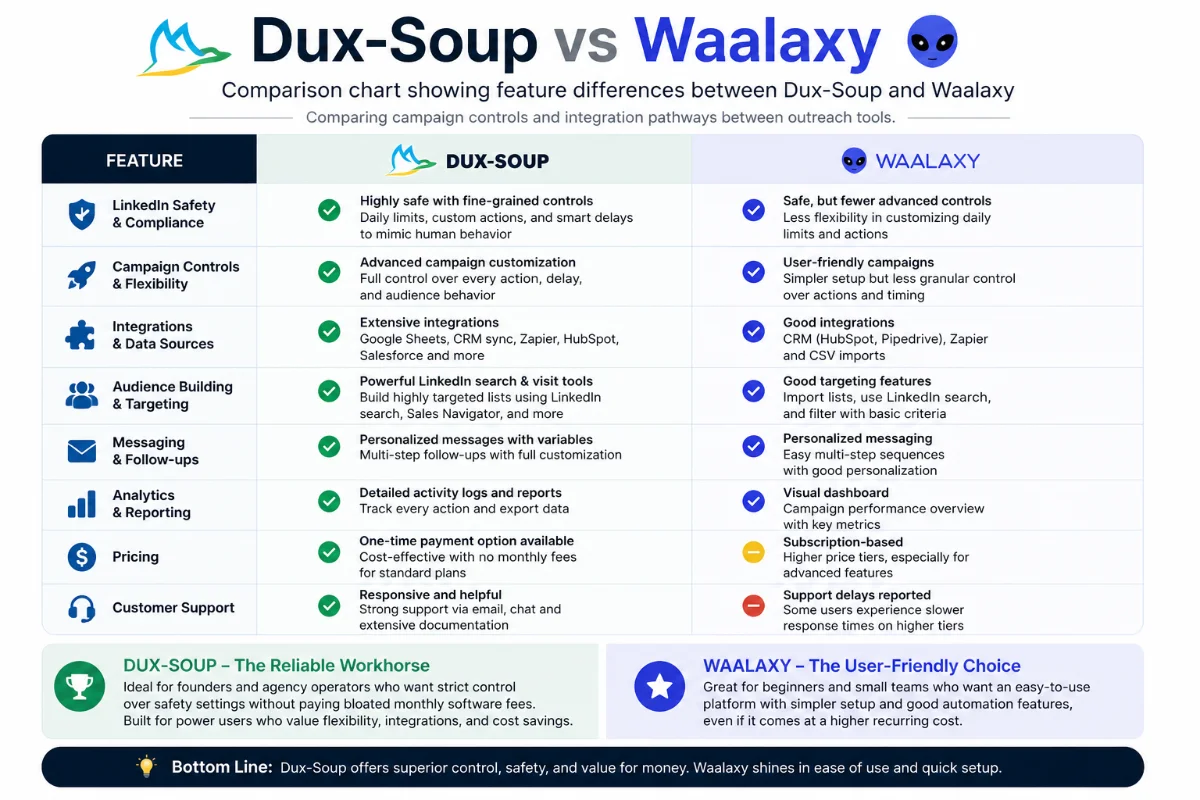
| Platform Architecture | Dux-Soup: Chrome Extension & Cloud Edition / Waalaxy: Chrome Extension + Cloud Hybrid |
| Starting Price | Dux-Soup: Pro ~$14.99/mo, Turbo ~$55/mo / Waalaxy: Free Tier, Business ~$60–$100+/mo |
| Free Trial Options | Dux-Soup: 14-Day Free Trial / Waalaxy: Freemium model (limited monthly actions) |
| Outreach Channels | Dux-Soup: LinkedIn (Profiles, InMail, Connection Requests) / Waalaxy: LinkedIn + Email Multi-Channel |
| CRM Integrations | Dux-Soup: HubSpot, Pipedrive, Zapier, Make, Webhooks / Waalaxy: HubSpot, Webhooks, Zapier |
| Safety Controls | Dux-Soup: Granular daily action caps, realistic random delays / Waalaxy: Pre-set weekly quotas |
| Customer Support | Dux-Soup: Live Chat, Zoom technical sessions, direct team help / Waalaxy: In-app messaging desk |
The Morning Pain That Made Me Compare These Tools
I still remember sitting at my desk at 7:15 AM with a cold cup of coffee, staring at 38 open browser tabs. I was manually searching for VP-level decision-makers on LinkedIn, clicking into each profile, copying their name and company title into a Google Sheet, and pasting custom connection notes one by one. By my second hour, my eyes were burning, I had sent a grand total of 18 connection requests, and LinkedIn popped up a warning box flagging “unusual commercial activity.”
If you have ever attempted manual B2B prospect building, you know that sickening feeling. You spend hours doing low-grade data entry instead of having meaningful sales conversations. Yet, every time I tried automated tools in the past, they felt sketchy. I once lost a personal LinkedIn account for two weeks because a cheap automation bot flooded 100 requests in 20 minutes without proper delay randomization.
I needed a system that felt disciplined, safe, and repeatable. I didn’t want to spam people; I wanted to build targeted executive pipelines without living inside LinkedIn tabs. That pain eventually forced me to put my own wallet on the line and rigorously test the two biggest names in mid-market LinkedIn outreach: Dux-Soup and Waalaxy.
Brand Overview: Finding What Fits Your Workflow
When I first signed up for Dux-Soup, I was deeply skeptical. It has been around for years, and because it started as a pure browser extension, I worried it might feel outdated compared to sleek cloud platforms. However, as soon as I started digging into its settings, I realized that longevity in the LinkedIn automation space isn’t an accident—it’s built on survival. LinkedIn actively hunts down aggressive bots, and Dux-Soup has survived by maintaining strict human-like behavioral emulation.
On the flip side, Waalaxy (built by a team in France) arrived on the scene with slick marketing, eye-candy interface designs, and an emphasis on multi-channel messaging (combining LinkedIn with automated email sequences). It looks modern right out of the gate, but beauty doesn’t always equal performance when you’re trying to manage complex pipelines without getting your profile restricted.
Why everything I’d tried before kept failing me
Before standardizing on Dux-Soup, my workflow was a mess of disconnected micro-tools. Here is why my previous attempts failed:
- Generic Scrapers: Tools like PhantomBuster were fine for extracting data, but they lacked real-time messaging sequences and required technical setup that broke every time LinkedIn updated its interface.
- Mass Cold Email Blasts: Buying unverified lead lists and blasting cold emails led to low response rates and burned domain reputations. LinkedIn inbox response rates were consistently 3x higher for my ICP.
- Aggressive Cloud Bots: Tools that didn’t let me tweak minute-by-minute action limits kept triggering LinkedIn security checkpoints.
Dux-Soup catered to my need for control. You can run it directly as an extension attached to your local browser session or choose their Cloud Edition if you want campaigns executing 24/7 on dedicated servers. Waalaxy uses a hybrid setup where it pulls data through your browser but executes actions via cloud queues. Both have merit, but their underlying philosophy on pricing, control, and data handling couldn’t be more different.
Hands-On Experience: Testing Dux-Soup vs Waalaxy
The First Three Days
Setting up Dux-Soup required about 20 minutes of dial-in time. I started on their Turbo Plan trial. I created a search list inside LinkedIn Sales Navigator targeting Director-level operations managers in North America. When I initialized Dux-Soup, the extension began auto-visiting profiles at a calm, human pace. I could literally watch it scroll down a prospect’s profile page, pause for 12 to 28 seconds, extract the public data, and then move to the next. That visual transparency gave me instant peace of mind.
Setting up Waalaxy felt even faster initially because of its wizard-driven UI. You pick a template (e.g., “Invite + 2 Messages”), import your LinkedIn search, and click launch. However, I quickly noticed that Waalaxy’s pre-packaged workflows can feel rigid if you want to modify individual wait times between actions mid-campaign.
By Week Two
By my second week, I had built a multi-stage drip campaign in Dux-Soup: Visit Profile → Wait 1 Day → Send Personalized Connection Request → Wait 3 Days after Acceptance → Send Value-Add Case Study. The response rate hovered around 24% for acceptances and 11% for message replies.
During this same window, I ran a parallel test on Waalaxy. The reply rate was comparable (around 10%), but I bumped into Waalaxy’s strict weekly action caps faster than expected. On Waalaxy’s mid-tier plans, once you hit your weekly limit, your campaigns pause until the counter resets. Dux-Soup allowed me to fine-tune daily pacing (e.g., exactly 25 invites and 40 profile visits per day) so my campaign ran consistently without random multi-day halts.
A Month In: Real World Quirks & Flaws
No software is flawless, and spending a month with both revealed clear pain points:
With Dux-Soup, if you use the local extension mode without upgrading to Cloud, your computer must remain turned on with Chrome open for actions to run. If your laptop goes to sleep at 2:00 PM, your outreach stops until the next morning. (Upgrading to Dux-Soup Cloud eliminates this, but it’s an essential distinction for budget users).
Furthermore, Dux-Soup’s CRM sync with Pipedrive required careful initial setup. In my testing, if you don’t map custom fields correctly at the start, you can occasionally get duplicate records created when contacts update their job titles. It wasn’t deal-breaking, but it required me to audit my CRM contact records twice a week.
With Waalaxy, my primary frustration was customer support responsiveness and cost scaling. When a campaign sequence failed to trigger follow-up emails for a batch of 40 leads, getting a resolution from Waalaxy’s support team took nearly two days through their chat widget. Moreover, as soon as you want to add team seats or run multiple accounts, Waalaxy becomes significantly more expensive per user than Dux-Soup.
Dux-Soup Pros
- Granular control over daily action caps & random delay intervals
- Flexible architecture (Browser Extension or 24/7 Cloud Edition)
- Substantially lower cost per seat for solo users & growing teams
- Exceptional, high-touch support team with live Zoom technical assistance
- Robust Webhook & Zapier integration for custom CRM workflows
Dux-Soup Cons
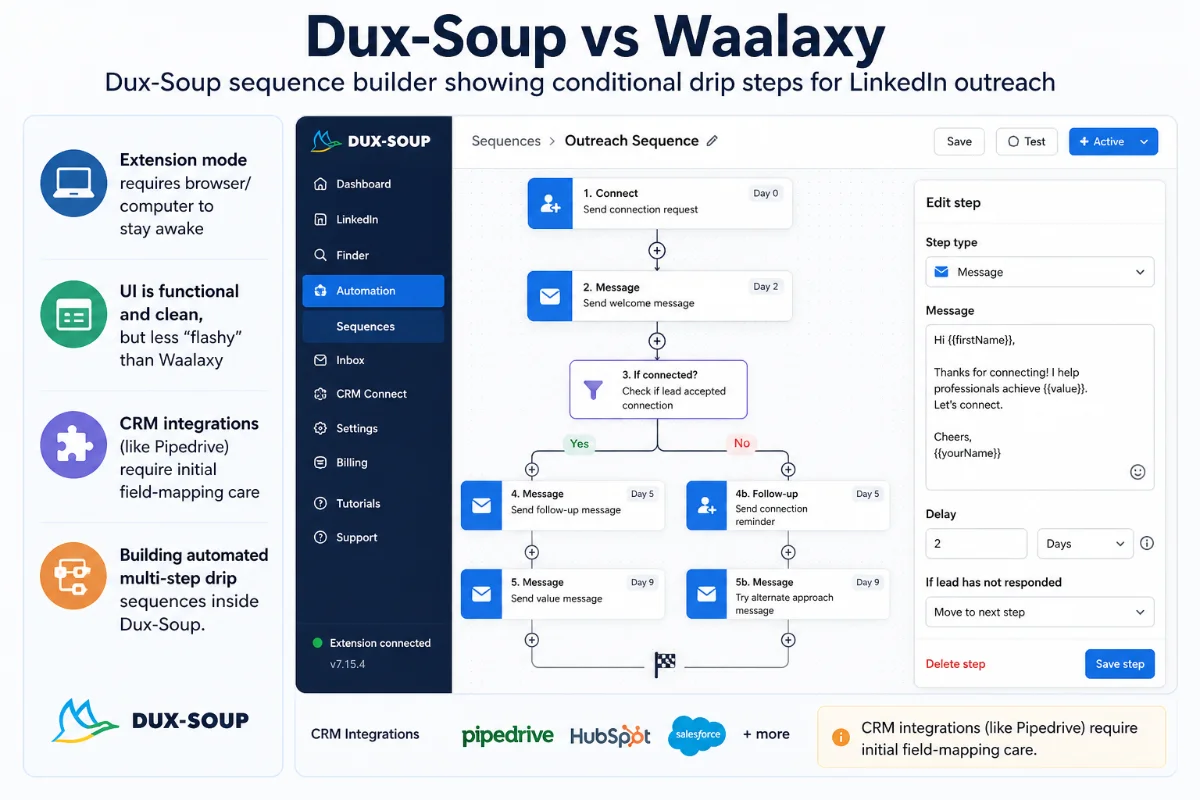
- Extension mode requires browser/computer to stay awake
- UI is functional and clean, but less “flashy” than Waalaxy
- CRM integrations (like Pipedrive) require initial field-mapping care
Deep-Dive Questions & Technical Capabilities
How does Dux-Soup handle daily connection safety limits compared to Waalaxy?
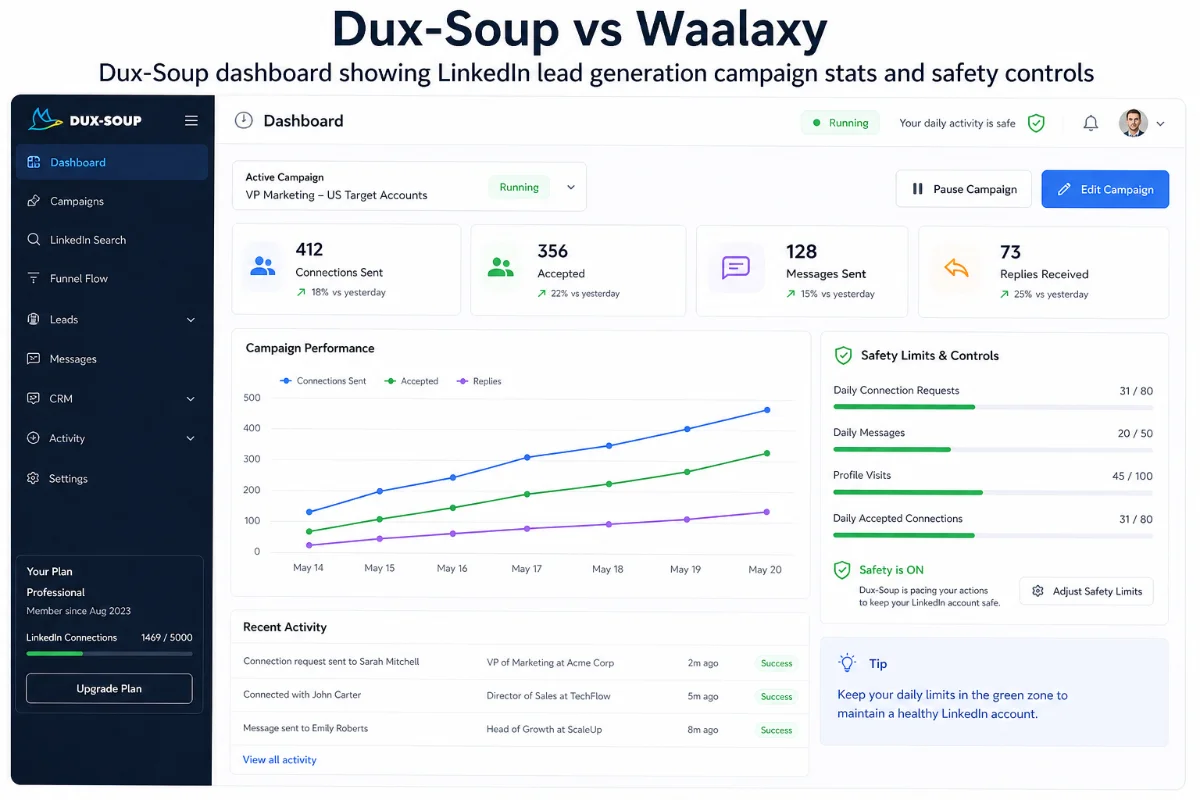
Account safety is where Dux-Soup shines. Dux-Soup allows you to set explicit min/max thresholds for profile visits, connection requests, and direct messages per day. It incorporates random delays between actions, mimics mouse scrolling, and respects standard LinkedIn daily volume recommendations. Waalaxy uses automated weekly quota caps, but gives you less micro-control over minute-by-minute action throttling.
Does Dux-Soup require your computer to stay powered on?
It depends on the plan you choose. If you select Dux-Soup Pro or Turbo (Extension mode), actions run directly through your browser, meaning Chrome must be active. However, if you opt for Dux-Soup Cloud Edition, campaigns execute completely on Dux-Soup’s secure cloud infrastructure, running 24/7 even when your computer is turned off.
How seamless is the Dux-Soup CRM integration with tools like Pipedrive and HubSpot?
Dux-Soup offers native integrations for both HubSpot and Pipedrive, alongside Zapier and Make webhooks. When a prospect responds on LinkedIn, Dux-Soup can automatically update their deal stage in your CRM, log the message history, and create new contact records. While you must pay attention during initial field mapping to keep data clean, it creates a hands-free pipeline once configured.
Can Dux-Soup run multi-channel email and LinkedIn sequences?
Dux-Soup focuses deeply on LinkedIn natively (invites, follow-ups, InMails, profile endorsements). However, by connecting Dux-Soup webhooks to platforms like Zapier, Make, or Lemlist, you can easily trigger cold email steps based on LinkedIn engagement. Waalaxy includes email sending natively inside its upper-tier plans, but requires you to connect your own custom SMTP/email provider.
What is the true cost comparison between Dux-Soup and Waalaxy for small teams?
Dux-Soup offers unmatched value. Dux-Soup Pro starts at roughly $14.99/month, while Turbo (with automated sequence drips and CRM webhooks) sits around $55/month. Waalaxy’s effective business tiers frequently range from $60 to over $100 per month per user once you bypass basic limits. For an agency or team of three SDRs, Dux-Soup can save you thousands of dollars annually.
Top 5 Reasons to Choose Dux-Soup
- Granular Human-Emulation Safety: You retain complete control over profile visit speeds, randomized delay algorithms, and daily hard caps to protect your valuable LinkedIn profile.
- Flexible Deployment Choice: Choose the lightweight, cost-effective browser extension mode or upgrade to the Cloud Edition for zero-maintenance 24/7 execution.
- Unbeatable Value for Money: Access professional-grade drip campaigns and automated follow-ups at a fraction of the cost charged by competitor tools.
- Superior Customer Support & Community: Direct access to technical specialists (including live Zoom troubleshooting) ensures you never get stuck when setting up workflows.
- Deep Developer & Webhook Extensibility: Seamlessly stream campaign events into HubSpot, Pipedrive, Google Sheets, or custom webhooks to feed your wider sales tech stack.
Start building targeted executive connections on complete autopilot with Dux-Soup’s 14-day trial.
Detailed Rating Breakdown
What Real Users Are Saying (Trustpilot & Reddit)
To ensure my personal experience wasn’t an anomaly, I spent hours analyzing verified customer feedback across Trustpilot and Reddit lead generation communities.
On Trustpilot, Dux-Soup maintains an impressive rating (4.6/5 stars across dozens of verified reviews). Long-time users frequently highlight platform stability and customer service responsiveness. One long-term reviewer noted that Dux-Soup allowed them to scale a foreign business expansion without traveling, leveraging consistent, structured daily connection campaigns.
However, users are also honest about bugs. A reviewer named John Collins pointed out that while Dux-Soup works great in standalone mode, syncing with Pipedrive required careful monitoring to prevent occasional mismatched candidate data. This matches my own hands-on finding: set up your CRM field rules meticulously before running high-volume campaigns.
On Reddit outreach threads (such as r/Entrepreneur and r/hubspot), sales practitioners note that while Waalaxy has a glossy interface, its higher price tiers and customer support delays can be frustrating. Dux-Soup is consistently recognized as a reliable workhorse for founders and agency operators who want strict control over safety settings without paying bloated monthly software fees.
Head-to-Head Competitor Breakdown
To help you see where Dux-Soup and Waalaxy sit in the wider ecosystem, I compared them against other popular outreach solutions I’ve used over the years.
| Platform | Primary Deployment | Best For | Monthly Price Range | Key Drawback |
|---|---|---|---|---|
| Dux-Soup | Extension / Cloud | Agencies, SDRs, Solopreneurs | ~$14.99 – $55+/mo | Extension needs active PC (unless on Cloud) |
| Waalaxy | Extension / Cloud Hybrid | Beginners wanting UI gloss | $0 – $100+/mo | Expensive scaling & weekly quota caps |
| Expandi | Pure Cloud | Mid-market sales teams | ~$99/mo per seat | High entry cost for single users |
| Dripify | Pure Cloud | Visual sequence builders | ~$39 – $99/mo | Gets pricey fast across multiple seats |
Dux-Soup vs Waalaxy: Direct Feature Breakdown
When you pit Dux-Soup vs Waalaxy directly, the choice comes down to workflow control versus automated simplicity. Waalaxy treats LinkedIn outreach like a rigid rail system: you pick pre-built sequence tracks, feed in leads, and let it run inside set parameters. It’s user-friendly for absolute novices, but limiting once you want custom flexibility.
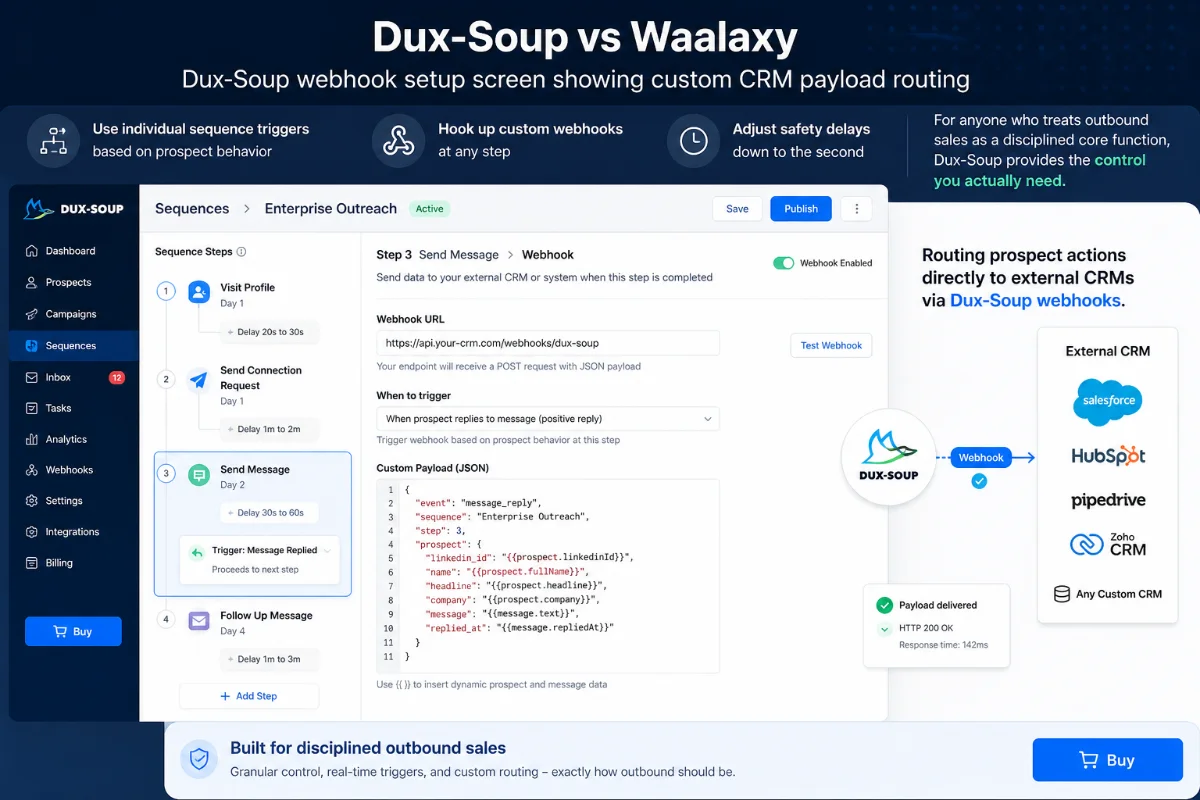
Dux-Soup treats outreach like an open workbench. You can control profile tagging, pause individual sequence triggers based on prospect behavior, hook up custom webhooks at any step, and adjust safety delays down to the second. For anyone who treats outbound sales as a disciplined core function, Dux-Soup provides the control you actually need.
Buying, Sizing & Account Protection Guide
If you’re deciding which Dux-Soup plan fits your current setup, here is my practical advice based on real testing:
- Dux-Soup Pro (~$14.99/mo): Pick this if you are a solo founder or consultant who just needs to automatically visit target profiles, collect clean prospect data, and send single-message outreach. It’s the most budget-friendly entry point in the industry.
- Dux-Soup Turbo (~$55/mo): Pick this if you need multi-step drip campaigns (e.g., auto-connect → wait 3 days → send follow-up message) and want to sync leads directly into HubSpot, Pipedrive, or Zapier.
- Dux-Soup Cloud Edition: Pick this if you don’t want to worry about keeping your computer open or managing local browser extensions. It runs on cloud servers 24/7 and is ideal for busy sales reps and agencies.
Golden Rules for LinkedIn Safety:
Regardless of the tool you choose, follow these strict limits to protect your LinkedIn account:
- Always start new accounts slow: 15–20 connection requests per day for the first two weeks.
- Keep your acceptance rate healthy: target highly relevant ICP lists using Sales Navigator filters so your invite acceptance stays above 20-30%.
- Withdraw pending connection requests older than 3–4 weeks regularly using Dux-Soup’s automated cleanup tool.
Final Verdict: Which One Deserves Your Money?
After six months of testing, running hundreds of outreach messages, and managing real campaign pipelines, my conclusion is clear.
Who SHOULD buy Waalaxy: If you are a complete beginner who has never run lead generation before, has zero desire to learn webhook or CRM setups, and values a visually pretty dashboard over granular safety controls and low monthly costs, Waalaxy offers an easy entry point.
Who SHOULD buy Dux-Soup: If you are a founder, SDR, or agency operator who wants complete control over your daily outreach pacing, reliable account safety algorithms, robust CRM sync pathways, and superior customer support—all at a price point that doesn’t eat your profit margins—Dux-Soup is the clear winner.
Dux-Soup solved my morning prospecting nightmare. Instead of wasting hours manually clicking profiles and managing messy spreadsheets, I now have a disciplined outreach machine running smoothly in the background while I focus on closing deals.
Frequently Asked Questions
Is Dux-Soup safe for my LinkedIn account?
Yes, Dux-Soup is designed specifically around human-emulation safety. It randomizes delays between profile visits, mouse scrolls, and messages, allowing you to set customizable daily limits to stay well within LinkedIn’s safety boundaries.
How does Dux-Soup compare to Waalaxy in pricing?
Dux-Soup is significantly more affordable. Dux-Soup plans start around $14.99/mo for Pro and ~$55/mo for Turbo, whereas Waalaxy’s functional tiers often range from $60 to over $100/mo per seat once you bypass basic action restrictions.
Can I use Dux-Soup without leaving my computer on?
Yes. While the standard Dux-Soup Pro and Turbo browser extensions run during active browser sessions, the Dux-Soup Cloud Edition runs 24/7 on dedicated cloud infrastructure without needing your computer to stay powered on.
Does Dux-Soup integrate natively with HubSpot and Pipedrive?
Yes, Dux-Soup features native integrations for both HubSpot and Pipedrive, letting you automatically sync prospect information, log messages, and update deal pipelines seamlessly.
Can I run Dux-Soup for multiple client accounts as an agency?
Yes, Dux-Soup offers dedicated agency license management, making it easy to allocate, manage, and reassign seats across multiple client profiles from a central dashboard.
Does Dux-Soup work with free LinkedIn or Sales Navigator?
Dux-Soup works with standard free LinkedIn accounts, Business Premium, and LinkedIn Sales Navigator. Using Sales Navigator is recommended for targeted search filtering and higher monthly usage limits.
[…] for heavy multi-channel cold email automation built into a single platform (consider SalesRobot or Waalaxy […]