

I spent my own cash testing EverBee Store’s AI workflow, research features, and Brain AI tools. Here is what actually happened when I launched a real shop from scratch.
Real User Data
No Marketing Hype
- Quick Spec Box
- The Midnight Setup Meltdown: My Old Blueprint Failed
- Discovering EverBee Store (And My Initial Skepticism)
- Hands-On Testing: Day 1 to Week 3 Experience
- What I Loved vs. What Frustrated Me (Pros & Cons)
- Specs & Key Questions Answered
- Top 5 Reasons to Choose EverBee Store
- Detailed Rating Breakdown
- Real Customer Feedback & Trustpilot Concerns
- EverBee Store vs. Competitors (eRank, Alura, & Shopify)
- Plan & Workflow Guide: How to Avoid Billing Traps
- Final Verdict: Who Should Buy vs. Who Should Skip
- Frequently Asked Questions
| Platform Type | AI-Powered E-Commerce Store Builder & Market Research Tool |
|---|---|
| Setup Time | Under 15 minutes for basic store generation |
| Key Features | EverBee Store AI builder, Brain AI marketing strategist, Product research, Email automation |
| Pricing Options | Free plan available; Paid plans range from $29 to $99+/month (Varies) |
| Payment Processing | Direct Stripe Integration (Accepts major credit cards globally) |
| Integrations | Etsy import, Wix migration, Instagram Shopping, Facebook Ads tracker |
| Editor Score | 4.1 / 5.0 Stars |
The Midnight Setup Meltdown: My Old Blueprint Failed
It was 2:15 AM on a Tuesday, and I was staring at a blank WordPress screen with three tabs open: a WooCommerce payment gateway error, a broken Mailchimp API key, and a $1,200 invoice from a freelance designer who had stopped answering my messages two days prior. I had spent nearly three weeks trying to launch a straightforward apparel store selling custom printed graphic tees and artisan accessories. Every time I thought the setup was complete, another technical roadblock popped up. Either the mobile layout looked like a garbled mess, or the shopping cart refused to pass test transactions through to Stripe.
My goal was modest. I wanted to take my ideas, validate demand using real search data, create simple product collections, and get a professional checkout link in front of my audience without spending months tinkering with code. Instead, I spent more time playing webmaster than actually making products or speaking to buyers.
Before hitting this wall, I had cycled through two distinct setups:
- The Freelance Developer Route: I hired a contract web developer to build a custom storefront on WordPress. The project dragged past the deadline by three weeks, cost over a thousand dollars upfront, and left me with a clunky dashboard that required technical maintenance every time I wanted to swap out a header image.
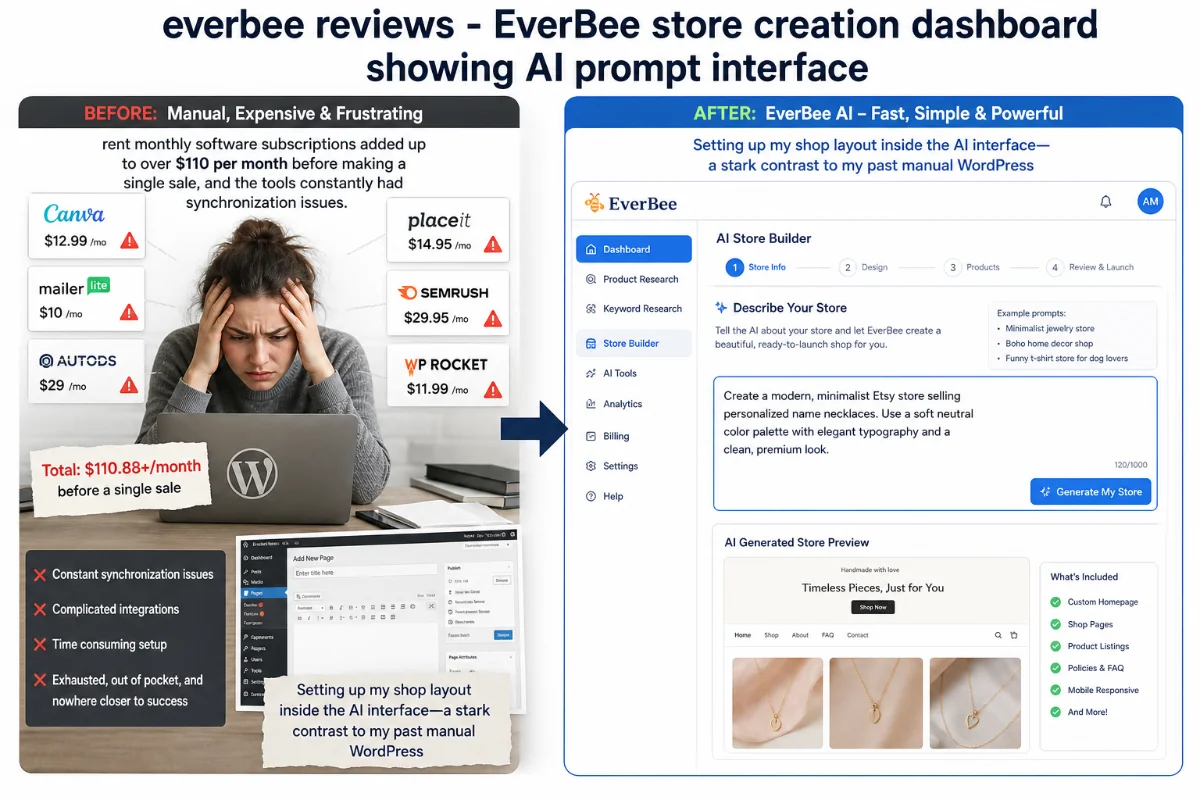
- The Disconnected Stack Method: I tried stringing together separate apps—using eRank for keyword research, Shopify for hosting, and a paid third-party tool for abandoned cart emails. Paying three different monthly software subscriptions added up to over $110 per month before making a single sale, and the tools constantly had synchronization issues.
I was exhausted, out of pocket, and nowhere closer to running an active online business.
Discovering EverBee Store (And My Initial Skepticism)
While scrolling through seller discussions during my lunch break, I kept seeing references to EverBee. Most long-time Etsy sellers knew the platform purely as a product research chrome extension. However, newer threads were talking about their newer feature: EverBee Store combined with Brain AI.
The pitch sounded suspiciously smooth: type in a short text prompt describing your product idea, and the platform generates a responsive online storefront complete with product listings, category pages, email workflows, and Stripe payment processing in a couple of minutes.
Honestly, I was deeply skeptical. I have tested dozens of “one-click website builders” over the past five years. Usually, “AI-generated site” means a generic single-page template filled with canned text, broken button links, and ugly stock images that look obviously fake to any shoppers. But because I was burnt out from my previous attempts, I pulled out my credit card, signed up for an account, and decided to put their claim to the test in real time.
Hands-On Testing: Day 1 to Week 3 Experience
Day 1: The 15-Minute Launch Test
I logged into the dashboard, navigated to the EverBee Store tab, and hit “Create with AI”. The system offered three starter paths: build from scratch using AI, import existing listings from an Etsy shop, or migrate over from Wix. I selected the fresh AI route and chose the apparel/clothing category.
The system prompted me for a brief text description. I typed: “A clean minimalist streetwear brand focusing on organic cotton t-shirts and neutral-tone accessories.”
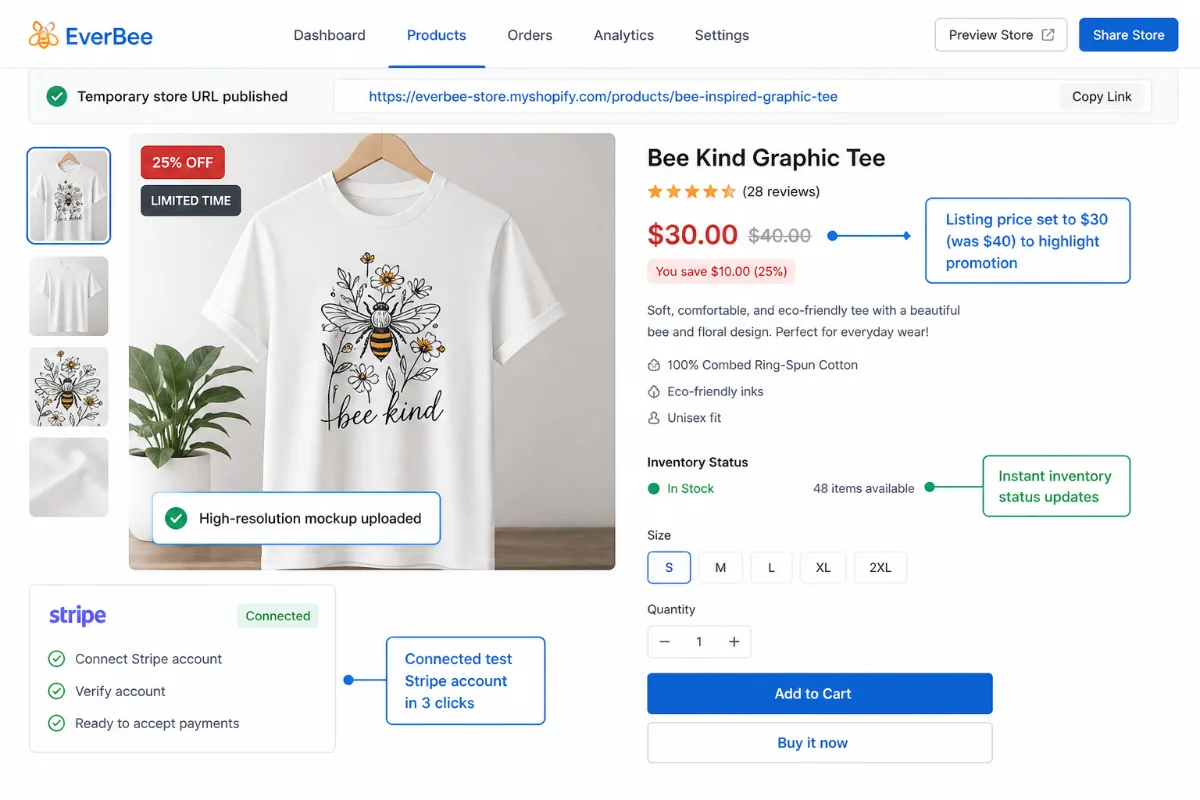
I hit enter and timed it. In under forty seconds, the backend generated a clean, full-width store preview. It wasn’t just a static mockup either. It included structured product categories, testimonial layout blocks, rounded design styling, a pre-configured checkout flow, and a functional mobile preview that adjusted correctly when I dragged my browser window down to phone dimensions. I uploaded a high-resolution mockup of a white graphic t-shirt, set the listing price to $30 (showing a strike-through original price of $40 to highlight a promotion), connected my test Stripe account in three clicks, and published the temporary URL.
Week 1: Putting Brain AI to Work
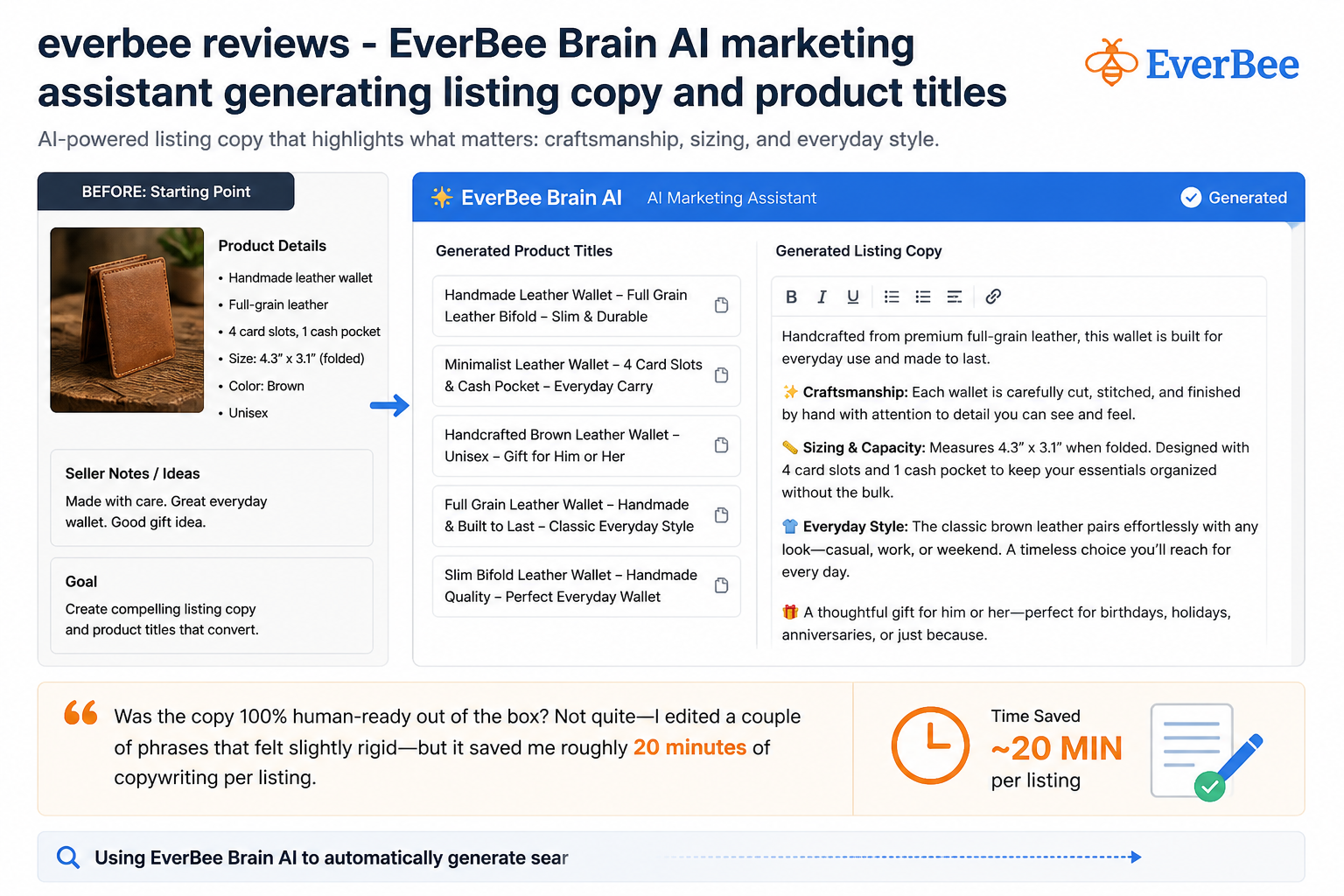
By day five, I started experimenting with the Brain AI assistant. This feature sits inside the dashboard and acts like an extra team member focused on product design and copywriting. Instead of staring at a blank screen trying to draft search-optimized titles and feature descriptions, I uploaded an image of a simple geometric necklace design I was testing.
I asked Brain AI to craft a full listing package based on my brand book guidelines. The tool scanned the image, read the brand tone I had selected, and generated a complete listing title, tag suggestions, and bullet-pointed copy emphasizing craftsmanship, sizing details, and everyday style choices. Was the copy 100% human-ready out of the box? Not quite—I edited a couple of phrases that felt slightly rigid—but it saved me roughly 20 minutes of copywriting per listing.
Week 3: Where the Cracks Appeared
By week three, the honeymoon phase settled down, and I began bumping into real-world friction. When using the product research features to pull historical sales estimates across broader keyword tags, I noticed the data exports weren’t instantaneous. Instead of downloading a CSV file directly from my browser tab, EverBee emailed the export file to my inbox. On two separate occasions, I had to wait nearly seven minutes for the email notification to show up.
Furthermore, because Etsy does not publicly reveal exact backend sales figures, EverBee relies on predictive modeling to estimate revenue numbers. For high-volume listings, these estimates were remarkably accurate when verified against public shop feedback counts. However, for brand-new listings with low reviews, the monthly sales estimates felt somewhat speculative. It’s an effective compass for spotting market trends, but treat the figures as approximate estimates rather than precise accounting figures.
What I Loved (Pros)
- Rapid AI storefront setup: Generates clean, mobile-responsive page layouts and store structures in under two minutes.
- Brain AI copy generation: Creates product descriptions, SEO listing titles, and marketing tags directly from uploaded image prompts.
- Integrated automated emails: Includes ready-to-use welcome series and abandoned cart recovery workflows without extra software plugins.
- Direct Stripe payment integration: Connects payment processing quickly and handles multi-currency transactions without complex developer tools.
- Etsy import capability: Port existing product catalogs over to an independent web shop in just a few clicks.
What I Didn’t Love (Cons)
- Delayed email data exports: Analytical CSV reports take 5 to 10 minutes to arrive in your inbox.
- Estimated revenue analytics: Search volume and sales figures rely on proprietary modeling rather than exact real-time sales reporting.
- Strict auto-renewal policies: Subscription renewals process automatically unless cancelled prior to your billing cutoff date.
Specs & Key Questions Answered
How fast can you set up EverBee Store?
From clicking “Create with AI” to having a live published URL with payment checkout enabled, the initial setup takes under 15 minutes. Customizing typography, color palettes, and adding multiple custom product lines took me roughly an hour.
How much does EverBee Store cost?
EverBee offers a free entry plan with limited search credits so you can explore the interface. Paid tiers typically start around $29 to $30 per month depending on current promotional discounts and annual billing commitments. Always check the official site pricing table before upgrading.
Is EverBee Store data 100% accurate?
No analytics software can guarantee 100% precision because major marketplaces like Etsy keep exact back-end order figures private. EverBee uses algorithmic estimates based on favorites, shop age, listing activity, and historical review patterns to project estimated sales volume.
Does EverBee Store support global payments and custom domains?
Yes. The platform connects directly with Stripe, allowing you to process global credit cards, manage international currencies, and calculate global shipping rates automatically. You can also hook up your own custom domain name directly in the business settings tab.
Is EverBee Store worth it for new creators?
If you want to skip web development costs and build a clean storefront backed by integrated email tools and product research, it offers tremendous value for solo creators and small businesses.
Top 5 Reasons to Choose EverBee Store
- All-in-One Creator Ecosystem: You don’t need to juggle separate subscriptions for web hosting, keyword research tools, and email marketing platforms. EverBee unites these workflows under one single dashboard login.
- Built-in Conversion Best Practices: The generated store pages follow proven e-commerce layouts—complete with sticky add-to-cart buttons, clear promotional badges, review cards, and clean typography that converts well on mobile phones.
- Brain AI Assistant Saves Hours: Whether you need help drafting an abandoned cart email sequence, adjusting product mockups, or writing product descriptions that incorporate search tags, the AI handles heavy copywriting tasks instantly.
- Automated Email Marketing: Recovering abandoned carts usually requires paying $20 to $50 per month for separate email software. EverBee includes basic welcome sequences and abandoned cart emails right inside the backend settings.
- Smooth Etsy Catalog Migration: If you already run an established Etsy shop, you can import your existing listing photographs, descriptions, and structural tags directly onto your own independent website without manual copy-pasting.
Skip weeks of web development and test your product ideas in minutes using EverBee Store’s AI workflow.
Detailed Rating Breakdown
Real Customer Feedback & Trustpilot Concerns
When you look at public review portals like Trustpilot, EverBee holds an average rating of 3.2 out of 5 stars across roughly 55 customer reviews. It is vital to examine what real buyers are saying so you know exactly what to expect before purchasing.
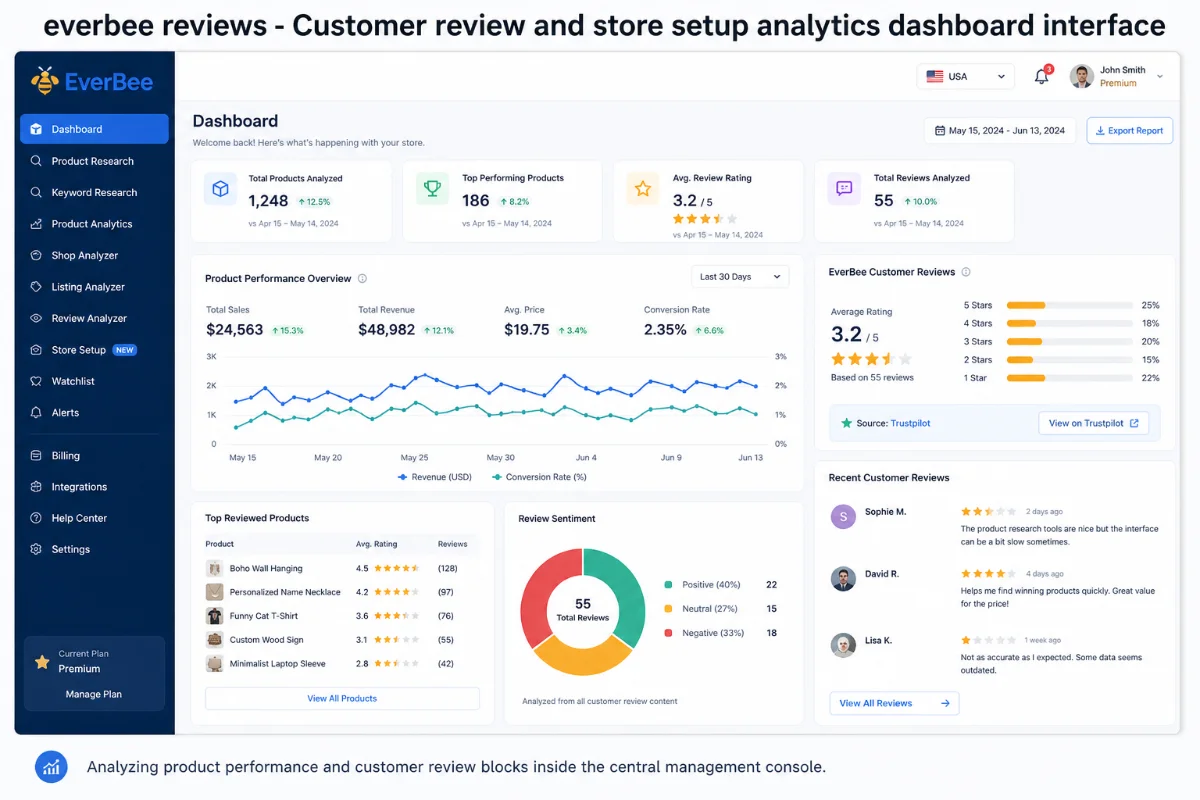
The Positives: Sellers regularly praise the tool’s product research capabilities and speed. Users report that it saves them dozens of hours when identifying product niches and setting up initial store layouts, making it much easier to transition from an Etsy marketplace shop to an independent website.
The Complaints & Pain Points: Negative reviews generally center on two issues:
- Export Delays: As noted by real user Oleksii on Trustpilot, downloading data reports can sometimes take 5 to 10 minutes via email, which can feel tedious when analyzing dozens of items back-to-back.
- Billing & Free Trial Terms: A common complaint comes from users who signed up for trial promotions or promotional discount codes and were surprised by annual auto-renewals when they forgot to cancel before their term ended. Be sure to mark your calendar if you only plan on using the service for a short evaluation period.
EverBee Store vs. Competitors (eRank, Alura, & Shopify)
To give you full clarity, let’s look at how EverBee Store compares both against my old manual setups and against popular direct alternatives in the e-commerce space like eRank, Alura, and Shopify.
| Feature / Capability | EverBee Store | eRank | Alura | Shopify + Dev |
|---|---|---|---|---|
| Instant AI Web Builder | Yes (Under 2 Mins) | No | No | No (Requires templates/dev) |
| Market & Product Research | Yes (Estimated Sales) | Yes (In-depth SEO) | Yes (Listing Data) | No (Requires third-party apps) |
| Built-in Brain AI Copilot | Yes (Full Copy & Mockups) | No | Partial (AI Assistant) | No (Requires Shopify Magic/Apps) |
| Automated Email Marketing | Included Native | No | Included Native | Requires Klaviyo/Apps |
| Etsy Catalog Import | One-Click Sync | N/A (Tool only) | Direct Sync | Requires Import Plugins |
EverBee Store vs. eRank
eRank remains a strong, cost-effective choice for pure Etsy SEO keyword research. However, eRank does not build independent online stores, generate AI store copy, or manage automated email marketing campaigns. If you want a complete business launcher rather than just keyword graphs, EverBee Store covers significantly more ground.
EverBee Store vs. Shopify
Shopify is an industry heavyweight capable of powering multi-million dollar brands. However, starting a fresh Shopify store from scratch requires selecting themes, configuring navigation menus, installing third-party apps for abandoned cart emails, and setting up SEO tools manually. EverBee Store bundles these functions into a far simpler interface designed specifically for quick launches without coding skills.
Plan & Workflow Guide: How to Avoid Billing Traps
Based on customer reviews on Trustpilot, here is my practical advice to get the most value out of EverBee while avoiding surprises:
- Start with the Free Tier: Use the free account tier first to explore the dashboard layout, test the Brain AI response quality, and run a few product research queries before committing money.
- Check Discount Conditions Carefully: If you sign up using a promotional discount (such as a 50% off billing banner), review your account settings immediately after to verify your active renewal date and subscription plan tier.
- Set a Calendar Reminder: If you only need EverBee to run market research or launch a temporary shop test for a single month, set a calendar notification three days before your monthly billing date to adjust your subscription preferences.
Final Verdict: Who Should Buy vs. Who Should Skip
EverBee Store is not a magical button that will generate sales without effort. You still need to pick attractive products, set reasonable prices, drive interest through social media or ads, and provide reliable customer support. Furthermore, if you require instant CSV analytics downloads inside your browser window without waiting for email delivery, the analytics reporting export delay may bother you.
However, if you are an Etsy seller looking to build an independent web shop, a print-on-demand creator testing fresh concepts, or someone who is tired of spending hundreds of dollars on freelance web developers and bloated software stacks, EverBee Store is a practical, efficient platform that gets you up and running quickly. It turns what used to be a multi-week technical project into a quick afternoon setup.
Frequently Asked Questions
Is EverBee Store easy to use for beginners without coding skills?
Yes. EverBee Store is built specifically for users without technical experience. You build your shop using simple text prompts and visual editor menus without touching HTML or CSS code.
Can I connect my existing custom web domain to EverBee Store?
Yes. You can edit your store settings and link your own custom domain name directly inside the account management panel.
How does EverBee Brain AI help with store marketing?
Brain AI analyzes your brand voice and images to generate product listings, search tags, email campaign copy, and mockups, saving you hours of copywriting effort.
Can I import listings directly from my Etsy shop to EverBee Store?
Yes. EverBee Store offers a direct import feature that lets you transfer existing Etsy listings, product photography, and item details directly onto your new website.
What payment methods can I accept on EverBee Store?
EverBee Store integrates directly with Stripe, enabling your shop to accept major international credit cards, debit cards, and digital wallet payment methods.
How do I cancel my EverBee Store subscription if I no longer need it?
You can manage or cancel your subscription at any time directly through your account billing settings dashboard prior to your scheduled renewal date.